跟着这篇走完,你会在本地把 Spring Boot 和 Ollama 接起来:建工程、引 starter、配 base-url、写一个 ChatClient 接口,再跑一次同步对话和一次流式输出。整个过程 6 步,每步都有一条命令能验证自己做对了没有。文中 localhost:11434 是 Ollama 的默认监听地址,模型固定用 qwen3:8b;如果你换了端口或换了 tag,把示例值替换掉即可。还没装过 Ollama 的话,先去从零跑通 Ollama + Qwen3 本地对话把服务跑起来再回来。
前置条件
| 项 | 要求 | 说明 |
|---|---|---|
| JDK | 17 或更高 | Spring Boot 3.5 要求 Java 17+;本文按站点基线 JDK 17 写 |
| Maven | 3.9 或更高 | 构建和启动都用它,低版本对 BOM import 支持不完整 |
| Spring Boot | 3.5.15 | 与站内其他 Spring AI 文章保持同一基线,避免版本行为不一致 |
| Ollama | 0.34.4,已拉好 qwen3:8b |
服务必须在跑、模型必须在本地,见前置文章《从零跑通 Ollama + Qwen3 本地对话》 |
| 内存 | 16 GB 以上 | qwen3:8b 按默认 Q4_K_M 量化后约 5 GB 常驻,再加上 JVM 本身 |
先跑这条确认 JDK 和 Maven 都在。
java -version && mvn -v看到 openjdk version "17..." 和 Apache Maven 3.9.x 就满足前两项。命令报 command not found 说明环境变量没配好,先解决再往下走。
第一步:确认 Ollama 在跑、模型已拉
Spring AI 只是 Ollama 的客户端,模型在不在、服务通不通跟 Java 代码无关。先做一次「服务端体检」,省得后面把 Java 代码来回改。
curl http://localhost:11434/api/version返回 {"version":"0.34.4"} 说明服务在监听 11434。返回 curl: (7) Failed to connect to localhost port 11434 是服务没起,回到前置文章的第一步。
再确认模型真的在本地。
ollama list输出里有 qwen3:8b 一行就算好。列表里没有它,先 ollama pull qwen3:8b 再回来;这一步跳过的话,后面 Spring 启动不报错、一调用就报 model not found,容易绕弯路。
第二步:创建 Spring Boot 工程
用 start.spring.io 生成:Project 选 Maven,Language 选 Java,Spring Boot 选 3.5.15,Java 选 17,依赖只勾 Spring Web。点 GENERATE 下载 zip,解压后得到一个标准工程目录。
工程里确认有这两个文件再继续。
ls pom.xml src/main/java能看到 pom.xml 和 src/main/java 目录就说明骨架完整。后面所有代码都写在 src/main/java 下,默认包名是你在生成页填的 Group + Artifact(本文示例用 com.example.ai)。
第三步:加 Spring AI Ollama 依赖
Spring AI 1.x 起,Ollama 的 starter 名叫 spring-ai-starter-model-ollama(旧名 spring-ai-ollama-spring-boot-starter 是 0.8 版本线的,别混用)。版本统一交给 spring-ai-bom 管,不要在单个依赖上写版本号。
打开 pom.xml,在 <dependencyManagement> 里加 BOM:
<dependencyManagement>
    <dependencies>
        <dependency>
            <groupId>org.springframework.ai</groupId>
            <artifactId>spring-ai-bom</artifactId>
            <version>1.1.8</version>
            <type>pom</type>
            <scope>import</scope>
        </dependency>
    </dependencies>
</dependencyManagement>
再在 <dependencies> 里加 starter:
<dependency>
    <groupId>org.springframework.ai</groupId>
    <artifactId>spring-ai-starter-model-ollama</artifactId>
</dependency>
验证依赖有没有真正拉进来。
mvn dependency:tree | grep spring-ai能看到 spring-ai-ollama、spring-ai-core 等模块就对了。列表里只有你手动写的那个依赖而没有 spring-ai-core,多半是 BOM 没生效——检查 <dependencyManagement> 是不是写进了父级而不是工程自己的 pom.xml。
第四步:写 application.yml 配置
Spring AI 对 Ollama 的连接前缀是 spring.ai.ollama。base-url 默认就是 http://localhost:11434,不写也行,但显式写出来能让后来的排查少一层猜测。
在 src/main/resources/application.yml 写入:
spring:
  ai:
    ollama:
      base-url: http://localhost:11434
      chat:
        options:
          model: qwen3:8b
          temperature: 0.7
model 的值要和 ollama list 里那一行完全一致(仓库名:tag)。这里写错的话,应用能正常启动,一调用就报 model not found。配置键名用中划线,options 是复数,这两处拼错会导致属性绑定不到、模型回退到默认的 mistral。
第五步:写一个 ChatClient 接口
Spring AI 1.x 推荐用 ChatClient,它由 ChatClient.Builder 构建,构造器注入即可,不需要手动 new。创建一个 ChatController:
package com.example.ai;

import java.util.Map;

import org.springframework.ai.chat.client.ChatClient;
import org.springframework.web.bind.annotation.GetMapping;
import org.springframework.web.bind.annotation.RequestParam;
import org.springframework.web.bind.annotation.RestController;

@RestController
public class ChatController {

    private final ChatClient chatClient;

    public ChatController(ChatClient.Builder builder) {
        this.chatClient = builder.build();
    }

    @GetMapping("/ai/chat")
    public Map<String, String> chat(@RequestParam(defaultValue = "用一句话介绍 Spring Boot") String message) {
        String reply = chatClient.prompt()
                .user(message)
                .call()
                .content();
        return Map.of("reply", reply);
    }
}链路是:prompt() 开一轮 → user() 放用户消息 → call() 同步拿到响应 → content() 取文本。ChatClient.Builder 是 Spring AI 自动配置注册的 Bean,Ollama starter 生效后它会自动绑定到 OllamaChatModel。
验证代码能编译。
mvn -q compile没有报错、退出码为 0 就过了。这一步如果抛 No qualifying bean of type ChatModel,说明自动配置没生效,优先检查第三步的依赖有没有进 BOM。
第六步:启动并跑通第一次对话
启动应用。
mvn spring-boot:run看到 Started ... in X seconds 就算起来了。日志里如果出现 CONNECTION REFUSED 或 model not found 的警告,先别慌——Spring AI 启动时可能预检,但这不必然阻塞;真正的判定以调用为准。
另开一个终端发起请求。
curl "http://localhost:8080/ai/chat?message=用一句话解释什么是依赖注入"第一次调用要等模型权重加载进内存,会卡几秒到几十秒,属正常现象。返回 {"reply":"依赖注入是..."} 且 reply 非空,就算跑通了。reply 为空字符串或 null,看应用日志里有没有模型加载失败、显存不足的信息。
核心概念
下面这张图是整条调用链路的走向,从左到右就是一次请求的完整路径。
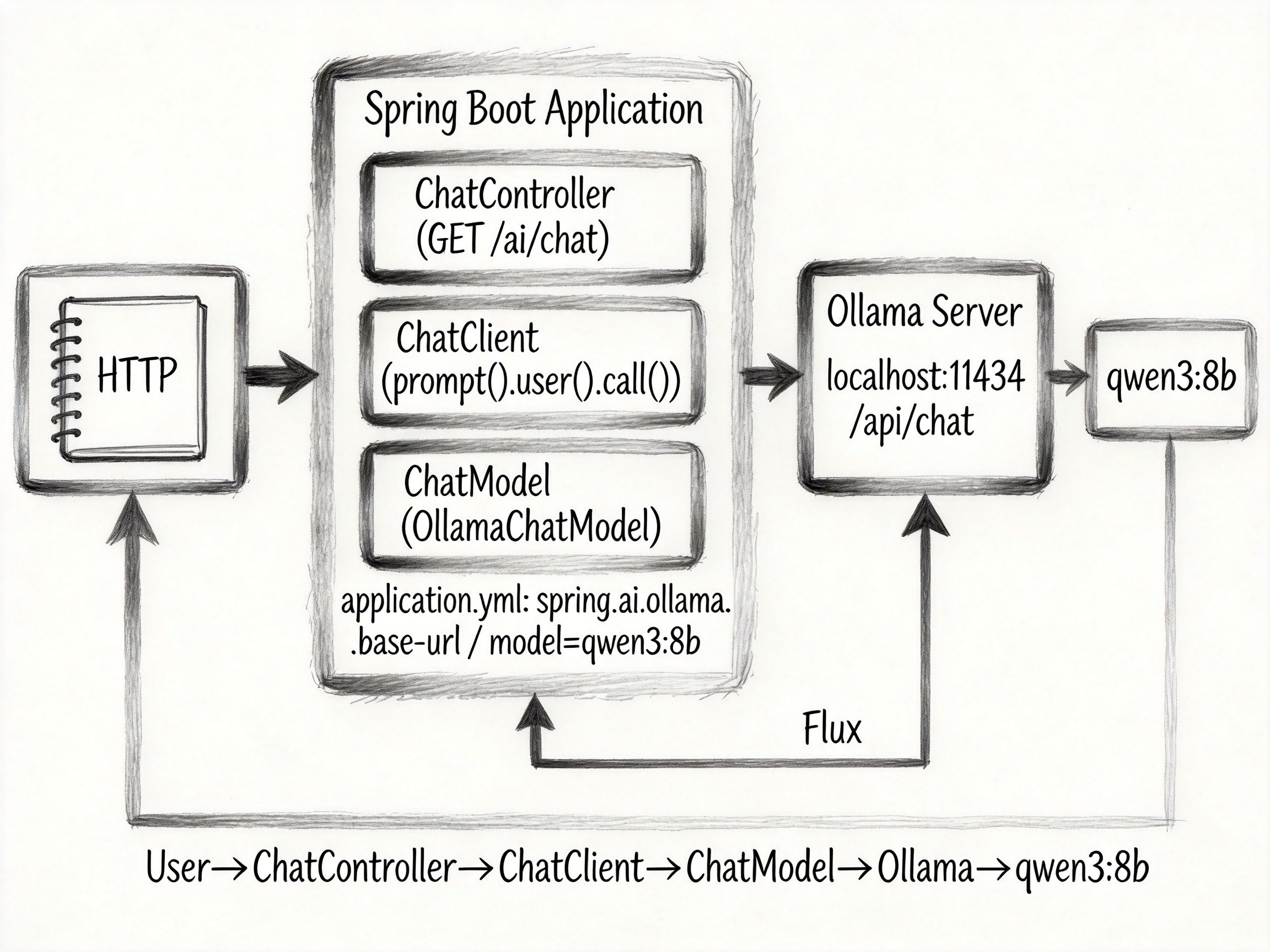
| 概念 | 是什么 | 类比 |
|---|---|---|
| ChatModel | Spring AI 对各家模型能力的统一抽象,Ollama 的实现在 OllamaChatModel |
像 JDBC,一套接口接不同驱动 |
| ChatClient | 面向应用的链式门面,封装 prompt / 参数 / 响应解析 | 像 RestClient 之于 HTTP,把底层细节藏起来 |
| base-url | Ollama 服务地址,默认 http://localhost:11434 |
像数据库连接串,指错就全连不上 |
| BOM | spring-ai-bom 统一管理 Spring AI 各模块版本 |
像 Spring Boot BOM 管 starter 版本,避免内部打架 |
| stream() | ChatClient 的流式方法,返回 Flux<String> 逐块推内容 |
像 curl -N 实时打印,而不是等全部生成完 |
| 自动拉模型 | spring.ai.ollama.init.pull-model-strategy=always 启动时自动 pull |
像容器启动自动拉镜像,生产环境不建议开 |
常见问题
Connection refused: POST http://localhost:11434/api/chat
现象:应用能启动,一调用接口就抛 ResourceAccessException: I/O error on POST request ... Connection refused。
原因:Spring AI 连不上 Ollama 的 11434 端口。要么 Ollama 服务没起,要么容器/远程场景下 base-url 写的是别人机器上的地址。
model "qwen3:9b" not found, try pulling it first
现象:连接是通的,Ollama 回一句 model not found 让你先 pull。
原因:本地没这个模型,或 application.yml 里 model 拼错(tag 写错、仓库名写错)。配置文件回退到默认 mistral 也会这样,因为你根本没拉过它。
No qualifying bean of type 'ChatModel'
现象:启动或注入 ChatClient.Builder 时抛 bean 找不到。
原因:Ollama 自动配置没生效。常见是 starter 没引、版本没走 BOM,或 spring.ai.ollama.chat.options.* 键名拼错导致装配条件不满足。
多轮对话到后面报 400,或回答丢掉开头的内容
现象:单轮没问题,消息越长越容易 400,或模型开始忘掉早先的设定。
原因:num-ctx 默认只有 2048,历史加提示词塞满后被截断。本地模型上下文窗口再大,也受配置里的 num-ctx 限制。
想用 stream() 流式输出,编译或运行时说不支持
现象:写了 chatClient.prompt().user(...).stream().content(),但 IDE 报方法不存在,或运行时行为异常。
原因:Spring AI 的流式只支持 Reactive 栈,命令式工程(只引了 spring-boot-starter-web)默认没有 Flux。要加 spring-boot-starter-webflux 依赖才能用。