
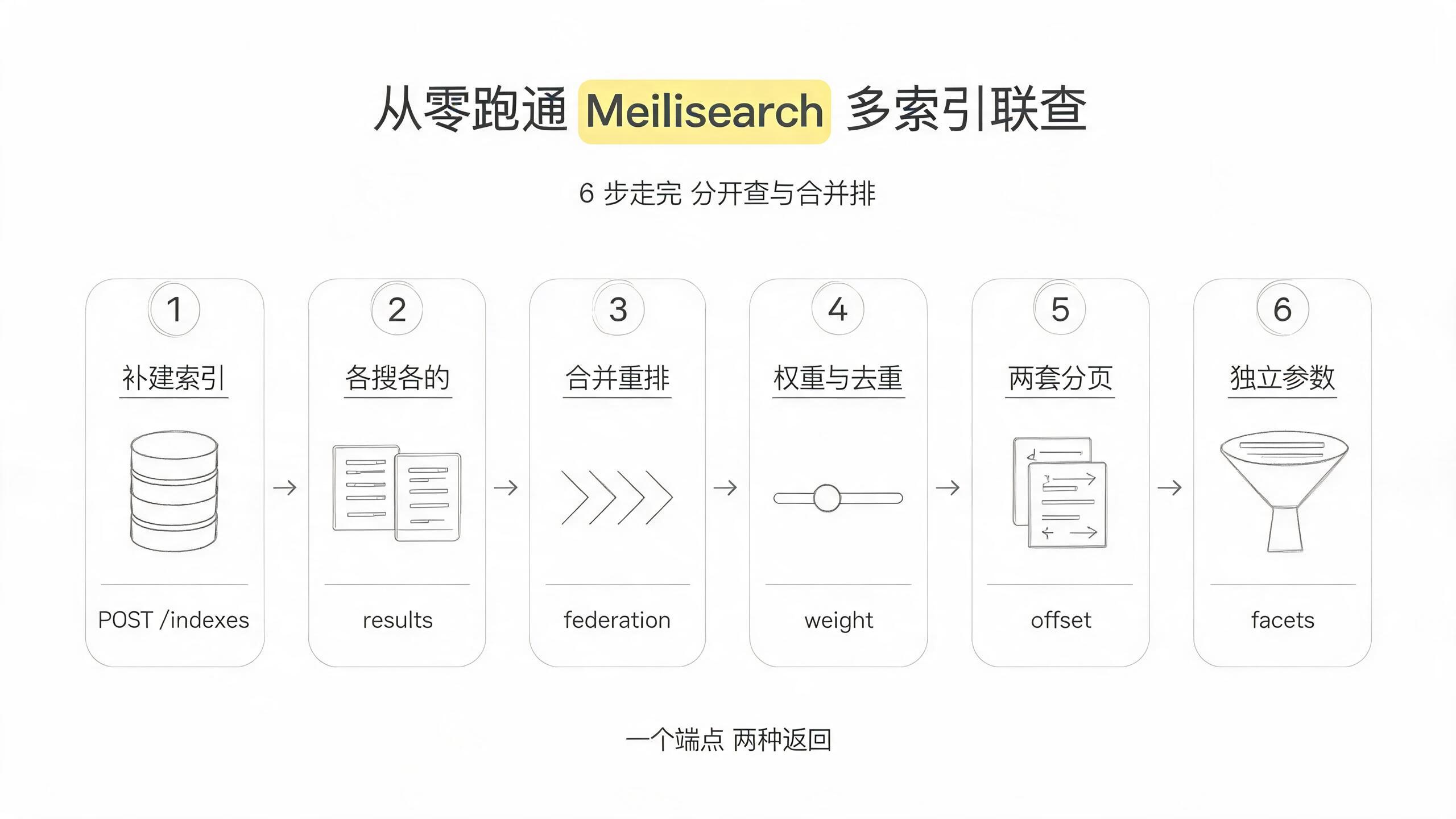
跟着这篇走完,你会在本地把 Meilisearch 的多索引联查跑通:movies 索引已经在(复用第一篇的),再补建 movie_ratings 和 movie_people 两个索引——这样手上就有三个独立索引了。然后你用同一个端点 /multi-search 演示两种模式:不传 federation 就是各归各的 results 数组(适合电商搜索栏的分区块 UI),传了 federation: {} 就是合并重排的单条 hits 列表(适合全局搜索框),再调 weight 让某个索引排靠前、用 distinct 跨索引去重、换两套分页体系。整个过程 6 步,每步一条验证命令。localhost:7700 + aSampleMasterKey 跟系列前几篇一致,索引名固定用 movies / movie_ratings / movie_people——你换了端口、key 或索引名,把示例值替换掉就行。
这篇默认你已经跑通了从零跑通 Meilisearch 本地搜索服务——Meilisearch 启动、异步任务轮询、movies.json 下载导入的套路全部复用,不再重复。跟系列前 8 篇的区别说在前面:前 8 篇搜的都是单索引内部的数据(中文分词、分面过滤、排序排名、向量语义……),这篇第一次跨出去——一次 HTTP 请求,搜多个索引,要么各归各展示,要么合并重排后一起返回。这也正是 Meilisearch multi-search 官方文档里两种模式(multi-index / federated)的分野。
前置条件
| 项 | 要求 | 说明 |
|---|---|---|
| Meilisearch | v1.54.3 或更高 | multi-search 和 federated search 都是稳定特性,低于这代版本 federation.distinct 等细节可能缺失 |
| movies.json | 已下载并导入 movies 索引 | 没导回第一篇第三步;本文不重复下载导入 |
| master key | aSampleMasterKey |
与系列一致 |
| curl | 任意版本 | 全文 curl 调 REST API |
先跑这条确认服务活着且 movies 索引已在。
curl 'http://localhost:7700/indexes/movies/stats' \
  -H 'Authorization: Bearer aSampleMasterKey'
{
"numberOfDocuments": 31944,
"isIndexing": false,
"fieldDistribution": { "id": 31944, "title": 31944, "genres": 31944, "release_date": 31944 }
}返回 "isIndexing": false 且 numberOfDocuments 为 31944 左右就满足条件。报 index_not_found 说明 movies 索引没建,回第一篇补。
第一步:补建 movie_ratings 和 movie_people 两个索引
movies 已经有了,但 multi-search 需要至少两个不同索引才能展示跨索引效果。这一步补建 movie_ratings(评分数据)和 movie_people(演职人员),让三个索引都能搜到 “batman” 相关的内容——movies 里有 Batman 系列电影,movie_ratings 里有这些电影的评分,movie_people 里有出演这些电影的演员和导演。
先说明一个本文刻意做的设计:三个索引统一含 title 字段。因为后面第四步要用 federation.distinct 按 title 跨索引去重,而去重的硬前提是去重属性名在各索引里完全一致——如果 movies 叫 title、movie_ratings 叫 movie_title,distinct 用哪个名字都会漏掉另一个。这是跨索引搜索建模时最容易埋的坑,本文用统一的 title 把它避开,也顺带讲清楚这条约束。
先显式建两个索引:
# movie_ratings 索引:字段 id / title / rating / votes
curl -X POST http://localhost:7700/indexes \
  -H "Authorization: Bearer aSampleMasterKey" \
  -H "Content-Type: application/json" \
  -d '{"uid":"movie_ratings","primaryKey":"id"}'

# movie_people 索引:字段 id / title / name / role
curl -X POST http://localhost:7700/indexes \
  -H "Authorization: Bearer aSampleMasterKey" \
  -H "Content-Type: application/json" \
  -d '{"uid":"movie_people","primaryKey":"id"}'
两条命令都返回 taskUid 和 "status": "enqueued"。往两个索引里塞数据,都选 Batman 相关的,这样后面搜 “batman” 时三个索引都能命中:
# movie_ratings:Batman 系列的评分数据(title 与 movies 里的电影名一致)
curl -X POST http://localhost:7700/indexes/movie_ratings/documents \
  -H "Authorization: Bearer aSampleMasterKey" \
  -H "Content-Type: application/json" \
  --data-binary '[
    {"id":1,"title":"Batman","rating":7.8,"votes":320000},
    {"id":2,"title":"Batman Returns","rating":7.0,"votes":210000},
    {"id":3,"title":"Batman Begins","rating":8.2,"votes":580000},
    {"id":4,"title":"The Dark Knight","rating":9.0,"votes":1800000},
    {"id":5,"title":"The Dark Knight Rises","rating":8.4,"votes":900000},
    {"id":6,"title":"The Batman","rating":7.8,"votes":650000},
    {"id":7,"title":"Batman v Superman","rating":6.4,"votes":730000}
  ]'

# movie_people:Batman 系列的演员和导演
curl -X POST http://localhost:7700/indexes/movie_people/documents \
  -H "Authorization: Bearer aSampleMasterKey" \
  -H "Content-Type: application/json" \
  --data-binary '[
    {"id":1,"title":"Batman","name":"Michael Keaton","role":"Actor"},
    {"id":2,"title":"Batman","name":"Jack Nicholson","role":"Actor"},
    {"id":3,"title":"Batman","name":"Tim Burton","role":"Director"},
    {"id":4,"title":"Batman Begins","name":"Christian Bale","role":"Actor"},
    {"id":5,"title":"The Dark Knight","name":"Heath Ledger","role":"Actor"},
    {"id":6,"title":"The Dark Knight","name":"Christopher Nolan","role":"Director"},
    {"id":7,"title":"The Batman","name":"Robert Pattinson","role":"Actor"},
    {"id":8,"title":"The Batman","name":"Zoë Kravitz","role":"Actor"}
  ]'
说明一下:官方 movies.json 只有 title / genres / release_date / overview 四个字段,没有评分和演职人员——那是另一个 IMDb 数据集才有的。所以这两个索引是手动造的,故意选了 Batman 系列,让三个索引搜同一个词都能命中。
导入是异步任务,轮询到 succeeded 后用 stats 确认:
curl 'http://localhost:7700/indexes/movie_ratings/stats' -H 'Authorization: Bearer aSampleMasterKey'
curl 'http://localhost:7700/indexes/movie_people/stats' -H 'Authorization: Bearer aSampleMasterKey'
返回体里 numberOfDocuments 分别是 7 和 8 就说明两个索引都导入完成。报 index_not_found 是索引没建成功,先查建索引的任务状态;isIndexing: true 是还在处理,再等等。
第二步:multi-index search——分开返回,各归各
multi-search 端点是 POST /multi-search,请求体必须有 queries 数组。不传 federation 字段(或显式传 null)就是 multi-index 模式——Meilisearch 对每条 query 独立执行搜索,返回一个 results 数组,数组里每个元素对应一条 query 的结果集。官方文档见 Multi-index search。
先跑一遍三个索引各搜 “batman”:
curl -X POST 'http://localhost:7700/multi-search' \
  -H 'Authorization: Bearer aSampleMasterKey' \
  -H 'Content-Type: application/json' \
  --data-binary '{
    "queries": [
      { "indexUid": "movies", "q": "batman", "limit": 3 },
      { "indexUid": "movie_ratings", "q": "batman", "limit": 3 },
      { "indexUid": "movie_people", "q": "batman", "limit": 3 }
    ]
  }'
返回体是 {"results": [...]} 数组,三条 query 各一个:
{
  "results": [
    {
      "indexUid": "movies",
      "hits": [
        { "id": 268, "title": "Batman", "genres": ["Fantasy", "Action"] },
        { "id": 364, "title": "Batman Returns", "genres": ["Action", "Fantasy"] },
        { "id": 1735, "title": "Batman & Robin", "genres": ["Action", "Science Fiction"] }
      ],
      "query": "batman",
      "processingTimeMs": 2,
      "limit": 3,
      "offset": 0,
      "estimatedTotalHits": 8
    },
    {
      "indexUid": "movie_ratings",
      "hits": [
        { "id": 1, "title": "Batman", "rating": 7.8, "votes": 320000 },
        { "id": 3, "title": "Batman Begins", "rating": 8.2, "votes": 580000 }
      ],
      "query": "batman",
      "processingTimeMs": 0,
      "limit": 3,
      "offset": 0,
      "estimatedTotalHits": 6
    },
    {
      "indexUid": "movie_people",
      "hits": [
        { "id": 1, "title": "Batman", "name": "Michael Keaton", "role": "Actor" },
        { "id": 3, "title": "Batman", "name": "Tim Burton", "role": "Director" }
      ],
      "query": "batman",
      "processingTimeMs": 0,
      "limit": 3,
      "offset": 0,
      "estimatedTotalHits": 2
    }
  ]
}
读一下这个响应体的结构——这是 multi-index 模式的签名:
- 顶层是
results数组,长度等于 queries 数组长度,顺序也一一对应——results[0]是 movies 的结果、results[1]是 movie_ratings、results[2]是 movie_people。 - 每条 query 可以带完全独立的参数——上例里三个 limit 都是 3,但你可以给 movies 写
limit: 10、给 movie_ratings 写limit: 2、给 movie_people 加个filter: "role = Director"——都独立生效。 - 每条 results 的结构跟单个
POST /indexes/{uid}/search的响应完全一致——hits/estimatedTotalHits/processingTimeMs这些字段一个不差。意味着你现有的单索引搜索处理逻辑几乎不用改,把输入从单条换成数组就行。
验证命令:
curl -s -X POST 'http://localhost:7700/multi-search' \
  -H 'Authorization: Bearer aSampleMasterKey' \
  -H 'Content-Type: application/json' \
  --data-binary '{"queries":[{"indexUid":"movies","q":"batman","limit":1},{"indexUid":"movie_people","q":"batman","limit":1}]}' \
  | jq '.results | length'
返回 2——results 数组长度等于 queries 长度就通了。返回 400 是某条 query 的 indexUid 拼错了,multi-search 的 fail-fast 行为会让整个请求直接失败,哪怕其他 query 是合法的——这个坑见 FAQ 第 2 项。
第三步:federated search——合并重排,一条 hits 列表
刚才的 multi-index 模式把三个索引的结果分开返回——如果你的 UI 是搜索栏下面分三个区块显示(“电影:”、“评分:”、“相关人员:”),这正合适。但如果你想要的是一条统一的结果流——不管结果来自哪个索引,按相关度排在一条列表里——那就要用 federated search。
切换条件很简单:请求体里加一个 federation 字段,哪怕是空对象 {}。
curl -X POST 'http://localhost:7700/multi-search' \
  -H 'Authorization: Bearer aSampleMasterKey' \
  -H 'Content-Type: application/json' \
  --data-binary '{
    "federation": {},
    "queries": [
      { "indexUid": "movies", "q": "batman" },
      { "indexUid": "movie_ratings", "q": "batman" },
      { "indexUid": "movie_people", "q": "batman" }
    ]
  }'
返回体结构完全变了——从 {"results": [...]} 数组变成了 {"hits": [...]} 单对象:
{
  "hits": [
    {
      "id": 268, "title": "Batman", "genres": ["Fantasy", "Action"],
      "_federation": { "indexUid": "movies", "queriesPosition": 0 }
    },
    {
      "id": 1, "title": "Batman", "name": "Michael Keaton", "role": "Actor",
      "_federation": { "indexUid": "movie_people", "queriesPosition": 2 }
    },
    {
      "id": 1, "title": "Batman", "rating": 7.8, "votes": 320000,
      "_federation": { "indexUid": "movie_ratings", "queriesPosition": 1 }
    },
    {
      "id": 364, "title": "Batman Returns", "genres": ["Action", "Fantasy"],
      "_federation": { "indexUid": "movies", "queriesPosition": 0 }
    }
  ],
  "processingTimeMs": 3,
  "limit": 20,
  "offset": 0,
  "estimatedTotalHits": 16
}
这就是 federated search 的“啊哈时刻”——请求体加一行 "federation": {},返回体就从数组变成对象,结果从各归各的三段变成一条合并流,按 merge 算法重排,每条 hit 多出一个 _federation 字段标识它来自哪个索引。这个字段的有无,就是两种模式的唯一开关。
读一下 _federation 里的字段:
| 字段 | 含义 |
|---|---|
indexUid |
这条文档来自哪个索引 |
queriesPosition |
它在 queries 数组里的下标(0-based),同一个 indexUid 在 queries 里出现两次时能靠它区分 |
weightedRankingScore |
可选,配了 federationOptions.weight 时出现,值是 _rankingScore × weight |
Meilisearch 内部怎么合并的?核心逻辑是归一化 ranking score 后按字典序比较:先比 relevancy score(words / typo / attribute / exactness / vector 合并值),tie 再看 sort/geosort,再 tie 看全局 ranking score,完美 tie 按 queries 数组顺序优先。详细规则见 federated search 官方文档——本文不展开,你只需要知道「结果按多级 tiebreak 排成一条降序流」就够用了。
验证命令:
curl -s -X POST 'http://localhost:7700/multi-search' \
  -H 'Authorization: Bearer aSampleMasterKey' \
  -H 'Content-Type: application/json' \
  --data-binary '{"federation":{},"queries":[{"indexUid":"movies","q":"batman"}]}' \
  | jq 'has("hits") and (has("results") | not)'
返回 true——有 hits 没有 results,就是 federated 模式。
第四步:weight 权重 + distinct 跨索引去重
federation 默认所有 query 等权合并——movies 的结果、movie_ratings 的结果、movie_people 的结果在排名上“公平竞争”,谁更相关谁排前面。但你大概率想要电影本身排在前面(用户搜 “batman” 最可能是找电影),评分和演职人员作为补充。这就用到 weight。
weight:让某个索引的结果排靠前
weight 是 federationOptions 里的一个浮点乘数,默认 1.0:
weight > 1.0:该 query 的所有结果 ranking score 被乘大,更容易排在前面weight < 1.0:结果 ranking score 被乘小,靠后weight = 0.0:等效于排除该 query 的全部结果(负数非法)
让 movies 权重拉到 1.5,另外两个压在 1.0 以下:
curl -X POST 'http://localhost:7700/multi-search' \
  -H 'Authorization: Bearer aSampleMasterKey' \
  -H 'Content-Type: application/json' \
  --data-binary '{
    "federation": {},
    "queries": [
      { "indexUid": "movies", "q": "batman",
        "federationOptions": { "weight": 1.5 } },
      { "indexUid": "movie_ratings", "q": "batman",
        "federationOptions": { "weight": 0.6 } },
      { "indexUid": "movie_people", "q": "batman",
        "federationOptions": { "weight": 0.6 } }
    ]
  }'
返回体里 movies 的结果会集中排在前面。想看每条 hit 的加权后分数,在 query 里加 "showRankingScore": true,这时 _federation.weightedRankingScore 字段会出现。
weight 调优建议:先用小步长试(1.2 / 0.8),不要一上来拉 2.0 vs 0.1。因为 weight 是乘法——如果 movies 里有一条 highly relevant 的 batman 结果(原始 rankingScore 0.95),乘 1.5 后 1.425,确实稳在前;但 movie_people 里一条特别精确的命中(直接精确匹配 title 字段),哪怕 weight 只有 0.6,乘出来的分也可能超过 movies 里一条弱相关的。weight 是「偏置」不是「开关」。
distinct:跨索引去重
注意第三步的返回体——同一个 “Batman” 出现了三次:movies(电影)里一条、movie_ratings(评分)里一条、movie_people(演职员)里两条。federated 合并后这些会散落在列表里。如果你想让每个电影只占一个位置,用 federation.distinct。
federation.distinct 做的是跨所有参与索引的去重,按指定属性值去——三个索引都有 title,所以 "distinct": "title" 会让 title 值相同的文档只留一条。前提是:去重属性必须在每个参与索引的 filterableAttributes 里声明过。
先给三个索引都声明 title 可过滤:
curl -X PATCH 'http://localhost:7700/indexes/movies/settings/filterable-attributes' \
  -H 'Content-Type: application/json' \
  -H 'Authorization: Bearer aSampleMasterKey' \
  -d '["title","genres"]'

curl -X PATCH 'http://localhost:7700/indexes/movie_ratings/settings/filterable-attributes' \
  -H 'Content-Type: application/json' \
  -H 'Authorization: Bearer aSampleMasterKey' \
  -d '["title","rating"]'

curl -X PATCH 'http://localhost:7700/indexes/movie_people/settings/filterable-attributes' \
  -H 'Content-Type: application/json' \
  -H 'Authorization: Bearer aSampleMasterKey' \
  -d '["title"]'
等三个 PATCH 任务都 succeeded,再发带 federation.distinct 的请求:
curl -X POST 'http://localhost:7700/multi-search' \
  -H 'Authorization: Bearer aSampleMasterKey' \
  -H 'Content-Type: application/json' \
  --data-binary '{
    "federation": { "distinct": "title" },
    "queries": [
      { "indexUid": "movies", "q": "batman" },
      { "indexUid": "movie_ratings", "q": "batman" },
      { "indexUid": "movie_people", "q": "batman" }
    ]
  }'
现在 “Batman” 这个 title 值只留一条,而不是 movies / movie_ratings / movie_people 各占一条。这就是跨索引去重的效果。
两个不能忘的边界:第一,去重属性必须在每个参与索引都声明 filterable,任一索引漏了整体 400——见 FAQ 第 1 项;第二,同一个请求里同时写 "federation": {"distinct": "title"} 和某条 query 里写 "distinct": "title",会直接 400(invalid_multi_search_distinct),两个 distinct 不兼容。
第五步:分页的两套体系
multi-search 的分页有两个变量:在哪层分页(query 层还是 federation 层)和用哪种模式(offset/limit estimation 还是 page/hitsPerPage exhaustive)。
先讲一个硬性限制:federated 模式下,queries 里的 offset/limit/page/hitsPerPage 全部被忽略——引擎先跑完所有 query,合并完结果,再在 federation 层分页。queries 里写了 limit 不报错但不生效,这是个静默坑,见 FAQ 第 3 项。
estimation 分页(默认)
不传任何分页参数时 federation 默认 offset=0 / limit=20。显式写:
curl -X POST 'http://localhost:7700/multi-search' \
  -H 'Authorization: Bearer aSampleMasterKey' \
  -H 'Content-Type: application/json' \
  --data-binary '{
    "federation": { "offset": 10, "limit": 5 },
    "queries": [
      { "indexUid": "movies", "q": "batman" },
      { "indexUid": "movie_ratings", "q": "batman" }
    ]
  }'
返回体里 offset: 10, limit: 5,跳过前 10 条返回接下来 5 条。这个模式性能好但 estimatedTotalHits 是估算值,做页码导航不够精确。
exhaustive 分页(精确总数)
需要精确知道总命中数(做“共 N 条结果、第 x/y 页”这种 UI)时,用 page + hitsPerPage:
curl -X POST 'http://localhost:7700/multi-search' \
  -H 'Authorization: Bearer aSampleMasterKey' \
  -H 'Content-Type: application/json' \
  --data-binary '{
    "federation": { "page": 2, "hitsPerPage": 5 },
    "queries": [
      { "indexUid": "movies", "q": "batman" },
      { "indexUid": "movie_ratings", "q": "batman" }
    ]
  }'
返回体字段变了:
{
  "hits": [ "..." ],
  "processingTimeMs": 4,
  "page": 2,
  "hitsPerPage": 5,
  "totalHits": 14,
  "totalPages": 3
}
从 estimatedTotalHits 变成了 totalHits(精确值),多了 totalPages(总页数)。代价是引擎要遍历所有命中文档来精确计数,大数据集下比 estimation 慢。
两种分页模式互斥——同一个 federation 对象里同时写 offset 和 page,行为未定义,实践中避免。
multi-index 模式下的分页
不传 federation 时,每条 query 的 offset/limit/page/hitsPerPage 独立生效——这跟 federated 模式相反。给 movies 写 "limit": 5、给 movie_ratings 写 "limit": 10,返回体里 results[0].limit = 5、results[1].limit = 10,各自截断各自的结果。
第六步:每条 query 带独立参数 + facetsByIndex
multi-search 每条 query 本质就是一个完整的 search 请求——所有 POST /indexes/{uid}/search 的参数都能用:filter / sort / attributesToRetrieve / facets / hybrid / vector 等。你可以在同一个请求里,让 movies 只搜 Action 片、让 movie_ratings 只返回评分 ≥ 8.0 的记录。
上一步已经给三个索引声明了 filterableAttributes(movies 有 title+genres,movie_ratings 有 title+rating,movie_people 有 title),现在发带独立 filter 的 federated search:
curl -X POST 'http://localhost:7700/multi-search' \
  -H 'Authorization: Bearer aSampleMasterKey' \
  -H 'Content-Type: application/json' \
  --data-binary '{
    "federation": {},
    "queries": [
      { "indexUid": "movies", "q": "batman",
        "filter": "genres = Action",
        "attributesToRetrieve": ["id","title","genres"] },
      { "indexUid": "movie_ratings", "q": "batman",
        "filter": "rating >= 8.0",
        "attributesToRetrieve": ["id","title","rating"] },
      { "indexUid": "movie_people", "q": "batman",
        "attributesToRetrieve": ["id","title","name","role"] }
    ]
  }'
返回体里 movies 的 hits 都带 genres: ["Action", ...],movie_ratings 的 hits 都满足 rating >= 8.0。每条 query 的 filter 互相独立、互不干扰——movies 用 genres 过滤、movie_ratings 用 rating 过滤,这正是 multi-search 比“分别发三个 HTTP 请求”更方便的地方:网络只走一次,但每条 query 保留独立参数。
你可能注意到中文字段名的问题——这些数据是英文的,filter 用英文;如果你的数据是中文,filter 表达式里的属性名和值要用你自己的字段,跟这篇中文搜索对对口径。
facetsByIndex:按索引分别返回分面分布
federation 对象还可以带 facetsByIndex——指定哪些索引的哪些属性要返回 facet 分布:
curl -X POST 'http://localhost:7700/multi-search' \
  -H 'Authorization: Bearer aSampleMasterKey' \
  -H 'Content-Type: application/json' \
  --data-binary '{
    "federation": {
      "facetsByIndex": {
        "movies": ["genres"],
        "movie_ratings": ["rating"]
      }
    },
    "queries": [
      { "indexUid": "movies", "q": "batman" },
      { "indexUid": "movie_ratings", "q": "batman" }
    ]
  }'
返回体多了一个 facetsByIndex 字段:
{
  "hits": [ "..." ],
  "facetsByIndex": {
    "movies": {
      "distribution": {
        "genres": { "Action": 8, "Fantasy": 2, "Science Fiction": 1 }
      }
    },
    "movie_ratings": {
      "stats": {
        "rating": { "min": 6.4, "max": 9.0 }
      }
    }
  }
}
facetsByIndex 让你能一次请求同时拿到 movies 的 genres 分布和 movie_ratings 的 rating 数值范围,不用分别在两条 query 里写 facets 参数再在应用层拼回来。
核心概念
这张架构图就是整条调用链路,从左到右看两种模式怎么分叉:
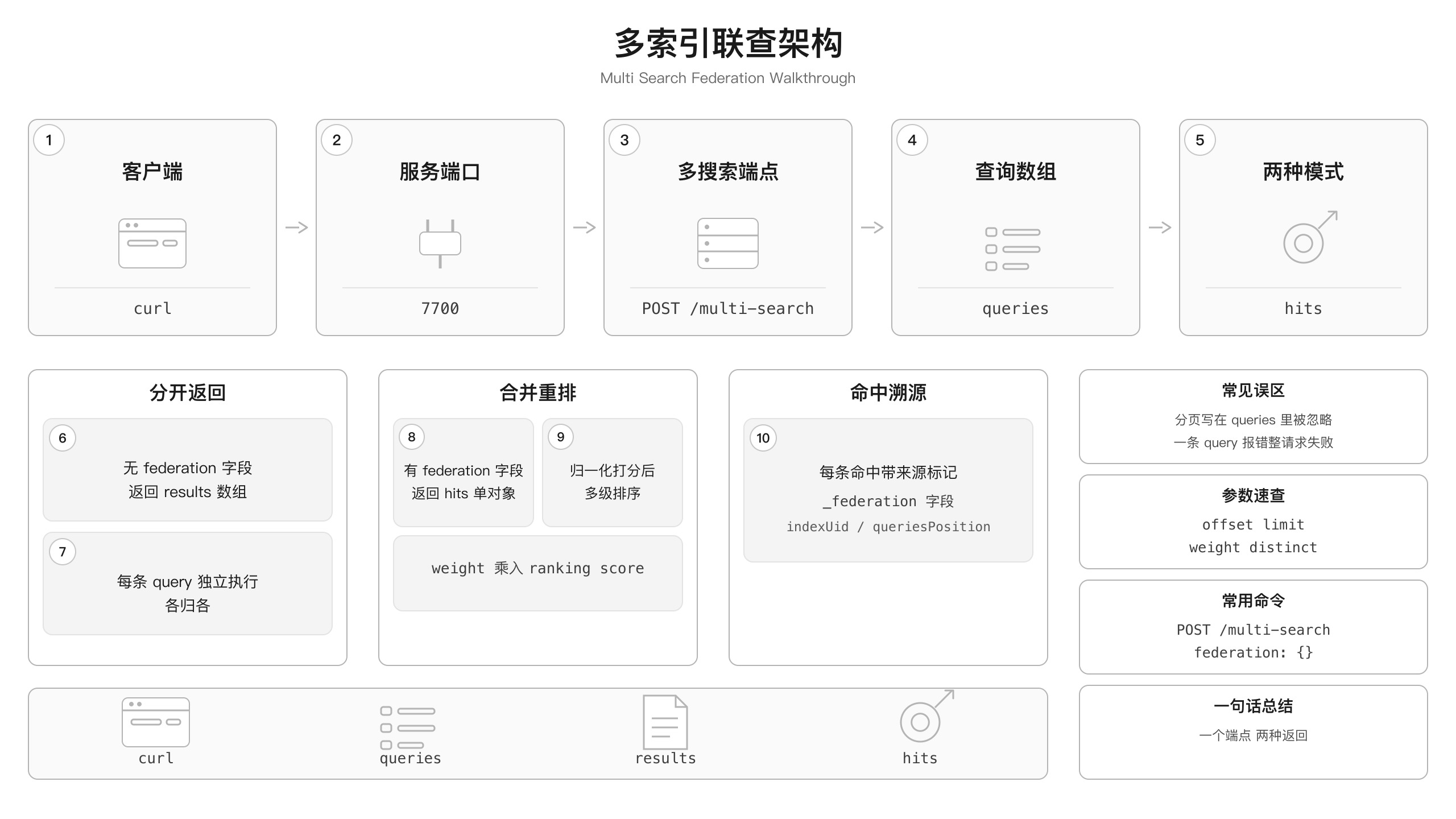
| 概念 | 是什么 | 类比 |
|---|---|---|
| multi-search | 一个端点一次请求搜多个索引的能力,入口是 POST /multi-search |
像搜索引擎的“同时搜网页+图片+视频”按钮 |
| federation | multi-search 请求体里的一个字段——有则合并重排返回单列表,无则各归各返回数组 | 像一个“合并开关”:关掉是多路返回,打开是一条统一结果流 |
| federation.weight | federationOptions 里的浮点乘数,乘到 ranking score 上控制某 query 结果的优先级 |
像 DJ 台的音量旋钮:权重 1.5 的 query 声音大一点,更容易被听到 |
| federation.distinct | 跨所有参与索引按指定属性值去重 | 像合并多个 Excel 表后按电影名去重——不管数据在哪个表,同名的只留一条 |
| fail-fast | multi-search 的错误处理策略:任一 query 参数非法,整个请求立即返回 400 | 像一条流水线:任一工位报错,整条线停下,不会让好的工位继续出活 |
要点回顾
- 一个端点,两种模式——
POST /multi-search的返回形态由federation字段决定:不传返回results[](各归各,适合分区块 UI),传了返回hits(合并单列,适合全局搜索框)。 - weight 是偏置不是开关——
federationOptions.weight是乘在 ranking score 上的浮点乘数(默认 1.0);用 1.2/0.8 这样的小步长调,别一上来拉 2.0 vs 0.1。 - distinct 跨索引去重——
federation.distinct按属性值跨所有参与索引去重,硬前提是去重属性在每个参与索引都声明过 filterable,任一漏了整体 400。 - 分页分两层两套——federated 模式下
queries里的 offset/limit 被静默忽略,分页要写在federation对象里:offset/limit(估算)或page/hitsPerPage(精确)二选一;multi-index 模式下各 query 独立分页。 - fail-fast 是原子语义——任一条 query 参数非法,整个 multi-search 立即 400,不返回部分成功;需要部分成功就在应用层并发发独立 search。
常见问题
federation.distinct 报 Attribute “xxx” is not filterable
现象:发带 "federation": {"distinct": "title"} 的 multi-search 返回 400,消息说 distinct 的属性名不是 filterable。
原因:federation.distinct 做的是跨索引去重,本质是对每个参与索引执行 filter 操作。去重属性必须在每个参与索引的 filterableAttributes 设置里显式声明过,任一索引漏了就整体失败。这不是 bug 是设计——去重依赖 filter 能力。
相关文章:Meilisearch federation.distinct 要求每个索引声明 filterableAttributes
multi-search 一条 query 报错,整个请求全挂
现象:multi-search 里三条 query,第二条的 indexUid 拼错了(比如 movie_rating 少了 s),整个请求返回 400——第一条和第三条的结果也拿不到,虽然它们完全合法。
原因:multi-search 是原子请求——引擎先做一轮全请求参数校验,任何一条 query 不通过就直接返回第一个错误,不进入执行阶段。这就是 fail-fast 策略。如果你需要部分成功的语义(某条 query 挂了其他照样返回),别用 multi-search,在应用层并发发独立的 search 请求。
federated 模式下 queries 里写 offset/limit 不生效
现象:给 federated search 的某条 query 写了 "limit": 5,但返回体里还是默认 20 条,limit 参数被静默忽略了——不报错也不生效。
原因:federated search 的分页是合并结果层面的——引擎先跑完所有 query(不做单 query 分页),合并重排后再分页。queries 里的 offset/limit/page/hitsPerPage 在 federation 模式下被完全忽略。分页参数必须写在 federation 对象里:federation.offset/limit(estimation)或 federation.page/hitsPerPage(exhaustive),二选一。
相关文章:Meilisearch federated search 在 queries 里写 offset/limit 被忽略