
跟著這篇走完,你會在本機把 Meilisearch 跑起來,並按增刪改查(CRUD)的順序把一套文檔操作完整走一遍:建索引 → 增(導入文檔)→ 查(搜索與過濾)→ 改(更新文檔)→ 刪(刪除文檔)。整個過程 6 步,每步都有一條命令能驗證自己做對了沒有。文中 localhost:7700 是 Meilisearch 的預設監聽地址,master key 固定用 aSampleMasterKey(≥16 字節示例值),索引固定用 movies,示例文檔用官方 movies.json;如果你換了端口、master key 或索引名,把示例值替換掉即可。如果你看過 從零跑通 Ollama + Qwen3 本地對話,知道本地服務的套路了,這次換個搜索引擎。

前置條件
| 項 | 要求 | 說明 |
|---|---|---|
| Meilisearch | v1.54.3 或更高 | 2026-10-01 發的當前 stable;項目每週發版,老版本 API 行為有差異,建議用最新 |
| 磁盤 | 1 GB 以上空閒 | movies.json 示例約 16 MB,Meilisearch 二進制本體幾十 MB |
| 記憶體 | 2 GB 以上 | Meilisearch 用記憶體映射文件,小數據集幾百 MB 即可,本文示例足夠 |
| curl | 任意版本 | 全文用 curl 調 REST API;jq 可選用於美化輸出 |
先跑這條確認 Meilisearch 裝好了。
meilisearch --versionmeilisearch 1.54.3返回 meilisearch 1.54.3(或更新版本)就滿足條件。命令報 command not found 說明沒裝,回到第一步裝完再往下走。
第一步:安裝並啟動 Meilisearch
Meilisearch 提供三種安裝方式,挑一個適合你平臺的;各平臺的完整清單和最新版本以官方安裝文檔為準。
# macOS(推荐)
brew install meilisearch

# Linux 一键脚本
curl -L https://install.meilisearch.com | sh

# Docker
docker run -d -p 7700:7700 getmeili/meilisearch:v1.54.3
裝完後啟動服務。dev 模式下 master key 可選,但本文從一開始就設上——所有 API 調用統一帶 Authorization 頭,也為後續切 production 模式做準備。
meilisearch --master-key="aSampleMasterKey"啟動後終端會輸出 Server listening on: "localhost:7700"。如果用的是 curl 腳本安裝方式,二進制在當前目錄,啟動命令改成 ./meilisearch --master-key="aSampleMasterKey"。macOS 上 brew services start meilisearch 可以讓服務常駐後臺。
驗證一下。
curl http://localhost:7700/health{"status":"available"}返回 {"status":"available"} 說明服務起來了。返回 curl: (7) Failed to connect to localhost port 7700 是服務沒起或端口被佔,先看 meilisearch 進程在不在、7700 端口是不是被別的服務佔了。production 模式拒絕無 key 啟動的情況見 FAQ 第 1 項,key 的權限劃分可查官方 master key 文檔。
第二步:創建索引
Meilisearch 的索引需要顯式創建(也可以靠 POST /documents 隱式創建,但顯式創建能提前指定 primaryKey,避免後續推斷失敗)。創建索引是異步任務,接口不等你建完,直接返回一張任務憑據。
curl -X POST http://localhost:7700/indexes \
  -H "Authorization: Bearer aSampleMasterKey" \
  -H "Content-Type: application/json" \
  -d '{"uid":"movies","primaryKey":"id"}'
返回體裡的 taskUid 就是這次任務的任務號,後續靠它查進度。
{
  "taskUid": 0,
  "indexUid": "movies",
  "status": "enqueued",
  "type": "indexCreation",
  "enqueuedAt": "2026-10-02T09:00:00.000Z"
}
uid 是索引的唯一標識(僅 a-z A-Z 0-9 - _,不可改),primaryKey 指定文檔主鍵字段名為 id——自動推斷失敗時必須顯式傳,這裡 movies.json 的文檔有 id 字段,顯式聲明最穩,推斷規則見官方索引與文檔 API。
拿 taskUid 查一下任務結果。
curl -X GET http://localhost:7700/tasks/0 \
  -H "Authorization: Bearer aSampleMasterKey"
{
"uid": 0,
"indexUid": "movies",
"status": "succeeded",
"type": "indexCreation",
"details": {
"primaryKey": "id"
},
"duration": "PT0.002S",
"enqueuedAt": "2026-10-02T09:00:00.000Z",
"startedAt": "2026-10-02T09:00:00.001Z",
"finishedAt": "2026-10-02T09:00:00.003Z"
}返回 "status":"succeeded"、"type":"indexCreation" 說明索引創建完成。如果 status 還是 enqueued,等一兩秒再查。返回 401 是 auth 頭沒帶或 master key 寫錯;未傳 primaryKey 且文檔無 id 字段會報 index_primary_key_no_candidate_found,見 FAQ 第 3 項。
第三步:增——添加文檔(Create)
增就是往索引裡寫文檔。先用官方數據集批量導入,再補一條自定義文檔,後面第 4~6 步的查、改、刪都拿這條文檔當靶子。
先下載官方示例數據集 movies.json(31944 條電影記錄,來自官方快速上手),再 POST 到索引。
# 下载示例数据集
curl -L https://www.meilisearch.com/docs/assets/datasets/movies.json -o movies.json

# 添加文档到 movies 索引
curl -X POST http://localhost:7700/indexes/movies/documents \
  -H "Authorization: Bearer aSampleMasterKey" \
  -H "Content-Type: application/json" \
  --data-binary @movies.json
{
"taskUid": 1,
"indexUid": "movies",
"status": "enqueued",
"type": "documentAdditionOrUpdate",
"enqueuedAt": "2026-10-02T09:00:01.000Z"
}文檔添加同樣是異步任務,taskUid 只表示任務入隊,文檔尚未被索引。Meilisearch 所有寫操作——創建索引、添加文檔、更新文檔、改設置、刪除——都排在同一條 FIFO 隊列裡,任務狀態按 enqueued → processing → succeeded(或 failed)流轉。所以 POST 完必須輪詢 GET /tasks/{uid} 到 succeeded,才能確認數據真的到位(任務字段含義見官方 tasks API)。這裡有個高頻坑:不等任務跑完就去搜,拿到的必然是空結果,別急著懷疑索引沒建成功。
反覆查 task 1 的狀態,直到 succeeded:
curl http://localhost:7700/tasks/1 -H "Authorization: Bearer aSampleMasterKey"嫌手動查麻煩,用一行 shell 輪詢:
while ! curl -s http://localhost:7700/tasks/1 -H "Authorization: Bearer aSampleMasterKey" | grep -q '"status":"succeeded"'; do sleep 0.5; done{
"uid": 1,
"indexUid": "movies",
"status": "succeeded",
"type": "documentAdditionOrUpdate",
"details": {
"receivedDocuments": 31944,
"indexedDocuments": 31944
},
"duration": "PT2.418S",
"enqueuedAt": "2026-10-02T09:00:01.000Z",
"startedAt": "2026-10-02T09:00:01.002Z",
"finishedAt": "2026-10-02T09:00:03.420Z"
}movies.json 有近 3.2 萬條記錄,本地機器通常幾秒內完成。任務完成後 details.indexedDocuments 從 null 變為實際索引文檔數。
確認文檔都進去了。
curl -X GET http://localhost:7700/indexes/movies/stats \
  -H "Authorization: Bearer aSampleMasterKey"
{
"numberOfDocuments": 31944,
"isIndexing": false,
"fieldDistribution": {
"id": 31944,
"title": 31944,
"genres": 31944,
"release_date": 31944
}
}返回 "isIndexing": false 且 numberOfDocuments 為實際文檔數,說明文檔全部索引完、索引狀態已結束。isIndexing 還是 true 說明還在處理,繼續等。status 一直是 enqueued 或 failed 的情況見 FAQ 第 2 項。
批量導入之外,單條或小批寫入才是日常。再補一條自定義文檔,id 用 1001(官方數據集裡沒有這個 id,不會衝突):
curl -X POST http://localhost:7700/indexes/movies/documents \
  -H "Authorization: Bearer aSampleMasterKey" \
  -H "Content-Type: application/json" \
  --data-binary '[
    {"id": 1001, "title": "The Matrix", "genres": ["Action", "Science Fiction"], "release_date": 922838400}
  ]'
{
"taskUid": 2,
"indexUid": "movies",
"status": "enqueued",
"type": "documentAdditionOrUpdate",
"enqueuedAt": "2026-10-02T09:00:05.000Z"
}等 task 2 也 succeeded 後,這條文檔就進索引了,接著進入查詢環節。
第四步:查——搜索與過濾(Read)
查分兩類:一類是全文搜索(POST /search),一類是按主鍵或分頁把文檔取出來(GET /documents)。先看搜索。
搜 botman 會模糊匹配 Batman 系列電影。
curl -X POST http://localhost:7700/indexes/movies/search \
  -H "Authorization: Bearer aSampleMasterKey" \
  -H "Content-Type: application/json" \
  -d '{"q":"botman"}'
{
"hits": [
{
"id": 268,
"title": "Batman",
"genres": ["Fantasy", "Action"],
"release_date": 614563200
},
{
"id": 364,
"title": "Batman Returns",
"genres": ["Action", "Fantasy"],
"release_date": 708912000
}
],
"query": "botman",
"processingTimeMs": 1,
"limit": 20,
"offset": 0,
"estimatedTotalHits": 62
}q 是搜索詞,會經過預設 ranking rules 排序(words / typo / proximity / attributeRank / sort / wordPosition / exactness,規則見官方 ranking rules)。預設 typo tolerance 開啟——oneTypo ≥5 字符、twoTypos ≥9 字符,閾值見官方 typo tolerance——所以 botman 能模糊匹配 Batman(容錯 1 個拼寫錯誤)。返回體含 hits(匹配文檔陣列,預設前 20 條)、estimatedTotalHits(總匹配數)、processingTimeMs(耗時毫秒),字段定義見官方 search API。搜索返回體同時滿足三條就算通了:hits 陣列非空、estimatedTotalHits 大於 0、processingTimeMs 小於 100ms(小數據集)。搜不到任何結果,多半是任務還沒跑完或搜索詞差太多 typo,回第三步確認 task succeeded。
預設情況下所有屬性都不可過濾(原因見官方 filtering 文檔)。要按條件篩,得先用 settings 接口聲明 filterableAttributes,等設置任務完成後才能在搜索時用 filter 參數。
# 设置 genres 和 release_date 为可过滤属性
curl -X PATCH http://localhost:7700/indexes/movies/settings \
  -H "Authorization: Bearer aSampleMasterKey" \
  -H "Content-Type: application/json" \
  -d '{"filterableAttributes":["genres","release_date"]}'
{
"taskUid": 3,
"indexUid": "movies",
"status": "enqueued",
"type": "settingsUpdate",
"enqueuedAt": "2026-10-02T09:00:10.000Z"
}PATCH /settings 也是異步操作,返回 taskUid。必須等該任務 succeeded 後再發帶 filter 的搜索,否則會報 invalid_search_filter。輪詢 GET /tasks 確認設置已生效後,搜索帶 filter:
curl -X POST http://localhost:7700/indexes/movies/search \
  -H "Authorization: Bearer aSampleMasterKey" \
  -H "Content-Type: application/json" \
  -d '{"q":"","filter":"genres = Action"}'
{
"hits": [
{
"id": 6,
"title": "Judgment Night",
"genres": ["Action", "Thriller", "Crime"],
"release_date": 750643200
},
{
"id": 11,
"title": "Star Wars",
"genres": ["Adventure", "Action", "Science Fiction"],
"release_date": 233366400
}
],
"query": "",
"filter": "genres = Action",
"processingTimeMs": 0,
"limit": 20,
"offset": 0,
"estimatedTotalHits": 5403
}返回 hits 陣列裡每條電影的 genres 都包含 Action,說明 filter 生效了。如果加上 facets 參數(如 "facets":["genres"]),返回體裡的 facetDistribution 字段會顯示 genres 各分類的分佈計數。filter 報 Attribute "genres" is not filterable 是 settings 任務沒完成或屬性名寫錯,見 FAQ 第 4 項。
除了搜索,按主鍵取數和分頁瀏覽也屬於查。按 id 取剛才補的那條:
curl -X GET http://localhost:7700/indexes/movies/documents/1001 \
  -H "Authorization: Bearer aSampleMasterKey"
{
"id": 1001,
"title": "The Matrix",
"genres": ["Action", "Science Fiction"],
"release_date": 922838400
}列表用 GET /documents,配 limit / offset 分頁:
curl -X GET 'http://localhost:7700/indexes/movies/documents?limit=2&offset=0' \
  -H "Authorization: Bearer aSampleMasterKey"
{
"results": [
{
"id": 2,
"title": "Ariel",
"genres": ["Drama", "Crime", "Comedy"],
"release_date": 593395200
},
{
"id": 5,
"title": "Four Rooms",
"genres": ["Crime", "Comedy"],
"release_date": 818467200
}
],
"offset": 0,
"limit": 2,
"total": 31945
}total 是 31944 條數據集文檔加上新補的 1001。
第五步:改——更新文檔(Update)
Meilisearch 有兩條寫文檔的路由,語義不同:POST /documents 是「添加或替換」,同一個主鍵已存在就整條覆蓋;PUT /documents 是「添加或更新」,只更新傳入的字段,沒傳的字段原樣保留。改一條文檔通常用後者,兩者的差異官方 documents API 有對照說明。
把 1001 的標題改掉,只傳 title 一個字段:
curl -X PUT http://localhost:7700/indexes/movies/documents \
  -H "Authorization: Bearer aSampleMasterKey" \
  -H "Content-Type: application/json" \
  --data-binary '[
    {"id": 1001, "title": "The Matrix (Remastered)"}
  ]'
{
"taskUid": 4,
"indexUid": "movies",
"status": "enqueued",
"type": "documentAdditionOrUpdate",
"enqueuedAt": "2026-10-02T09:02:00.000Z"
}等 task 4 succeeded 後再查一次,確認只有 title 變了,genres 和 release_date 都還在:
{
  "id": 1001,
  "title": "The Matrix (Remastered)",
  "genres": ["Action", "Science Fiction"],
  "release_date": 922838400
}
注意 PUT 的局部更新只作用於頂層字段——傳入一個物件字段會整體替換該物件,沒寫的子字段會丟;想整條覆蓋改用 POST /documents。
第六步:刪——刪除文檔(Delete)
刪單條按主鍵來:
curl -X DELETE http://localhost:7700/indexes/movies/documents/1001 \
  -H "Authorization: Bearer aSampleMasterKey"
{
"taskUid": 5,
"indexUid": "movies",
"status": "enqueued",
"type": "documentDeletion",
"enqueuedAt": "2026-10-02T09:03:00.000Z"
}按 id 批量刪除,body 傳 id 陣列(官方 delete documents by batch):
curl -X POST http://localhost:7700/indexes/movies/documents/delete-batch \
  -H "Authorization: Bearer aSampleMasterKey" \
  -H "Content-Type: application/json" \
--data-binary '[1001, 25684]'按條件刪除,filter 語法與搜索一致,需先聲明 filterableAttributes(官方 delete documents by filter):
curl -X POST http://localhost:7700/indexes/movies/documents/delete \
  -H "Authorization: Bearer aSampleMasterKey" \
  -H "Content-Type: application/json" \
  --data-binary '{"filter": "genres = Science Fiction"}'
清空整個索引的文檔(索引本身保留):
curl -X DELETE http://localhost:7700/indexes/movies/documents \
  -H "Authorization: Bearer aSampleMasterKey"
刪除和添加一樣返回 enqueued 憑據,type 是 documentDeletion。等 succeeded 後 GET 對應 task,details.deletedDocuments 會給出實際刪掉的條數。
核心概念
這張架構圖就是整條調用鏈路,從左到右走一遍,搜索請求怎麼落進索引存儲就清楚了。
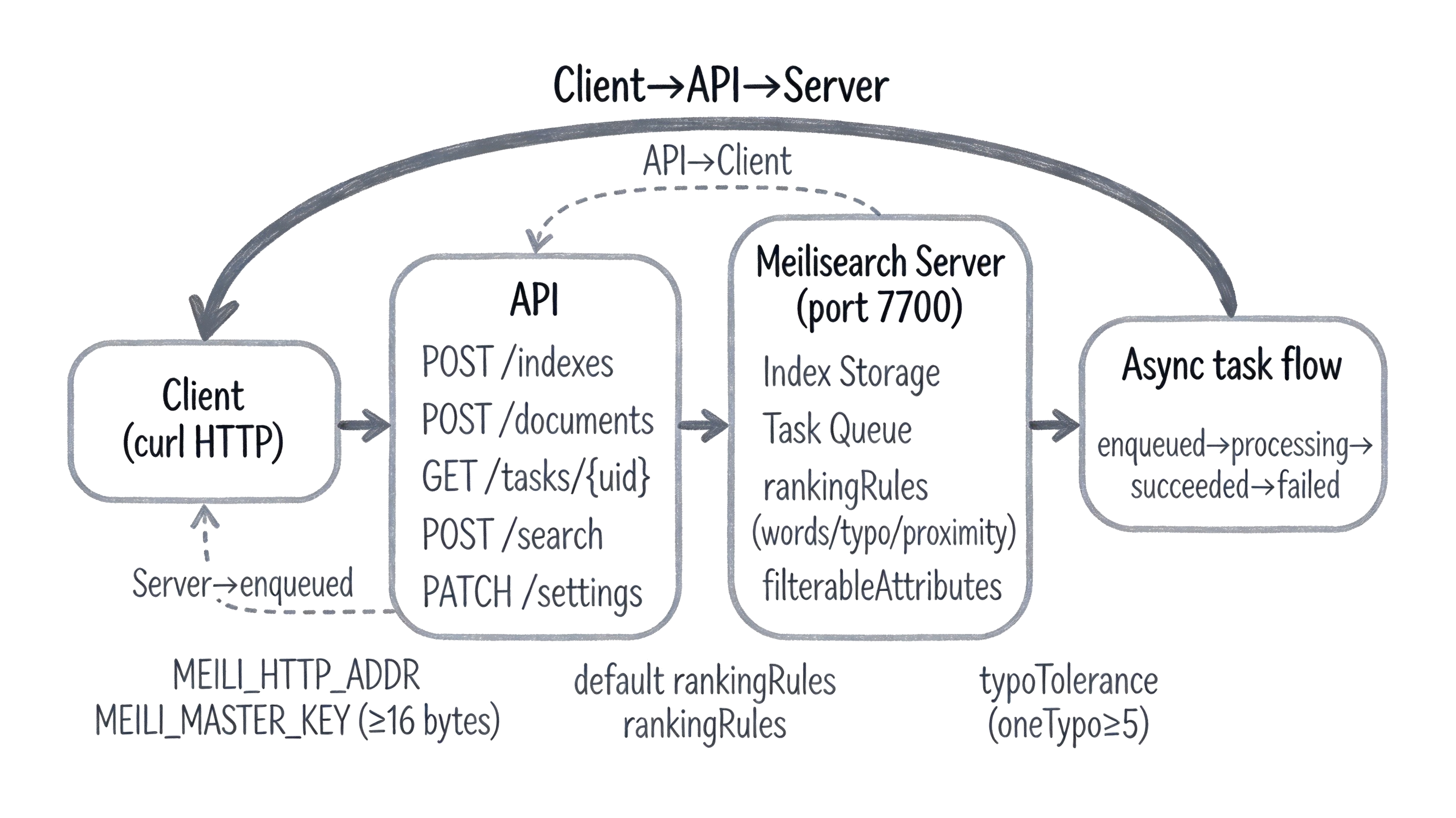
| 概念 | 是什麼 | 類比 |
|---|---|---|
| Meilisearch | 開源搜索引擎,Rust 實現,自部署後常駐 7700 端口提供 REST API | 像本地的 Elasticsearch-lite,裝好就有一個進程守在端口上 |
| 索引(Index) | 文檔的容器,每個索引有獨立的 uid、primaryKey 和 settings | 像數據庫裡的一張表,movies 索引放電影數據 |
| 文檔(Document) | 一條 JSON 記錄,有唯一主鍵值,存在索引裡 | 像表裡的一行數據,一條電影記錄就是一個文檔 |
| 異步任務(Task) | 寫操作(增 / 改 / 刪 / 改設置)不立即完成,返回 taskUid 入隊處理 | 像消息隊列裡的任務,POST 完只是入隊,要輪詢才知道做完沒 |
| primaryKey | 索引的主鍵字段,自動推斷以 id 結尾的字段,也可顯式指定 |
像數據庫主鍵,唯一標識一條文檔,推斷失敗就加不進去 |
常見問題
missing_master_key
現象:dev 模式跑通後切 MEILI_ENV=production 啟動,進程直接 abort 不運行。
原因:production 模式強制要求 ≥16 字節的 master key 作為安全基線,不設或過短直接拒絕啟動。
搜索返回 hits: [],estimatedTotalHits: 0
現象:POST /documents 返回了 taskUid,緊接著 POST /search 返回空結果。
原因:文檔添加是異步操作,taskUid 只表示入隊,文檔尚未被索引;必須輪詢 GET /tasks/{uid} 直到 status=succeeded。
index_primary_key_no_candidate_found
現象:POST 文檔後輪詢任務狀態是 failed,錯誤碼含 primary_key。
原因:未顯式指定 primaryKey 且文檔中找不到唯一以 id 結尾的字段;Meilisearch 自動推斷失敗。
相關文章:Meilisearch primary key 自動推斷失敗報 index_primary_key_no_candidate_found
invalid_search_filter:Attribute “genres” is not filterable
現象:搜索不帶 filter 正常返回結果,加 filter 參數後返回 400。
原因:該屬性未在 filterableAttributes 設置中聲明;Meilisearch 要求先在 settings 裡聲明可過濾屬性才能在搜索時用作 filter。