
跟著這篇走完,你會在終端把 Meilisearch 的分面搜索與過濾跑通:聲明可過濾屬性、寫 filter(搜索的過濾條件)組合與範圍條件、拿回分面分布(facetDistribution)與數值統計(facetStats),再用 facet-search 做分面值自動補全。整個過程 7 步,每步都有一條命令能驗證自己做對了沒有。
動手前先交代下環境。localhost:7700 是 Meilisearch 的預設監聽地址,master key 固定用 aSampleMasterKey(與第一篇一致),索引(Meilisearch 的獨立文檔集合,相當於一張數據表)固定用 books(本篇新建,不動第一篇的 movies),示例文檔是 6 條虛構書籍;你要是換了端口、master key 或索引名,把示例值替換掉就行。這篇預設你已經裝好並跑通了從零跑通 Meilisearch 本地搜索服務,還沒跑起來先回去把服務起了再回來,安裝、啟動、異步任務輪詢的套路全部複用第一篇。另外提醒一句:本文所有 filter 一律用官方字符串語法——顯式 AND/OR/NOT 關鍵詞加括號,不存在逗號或豎線操作符;範圍過濾的寫法是 price 10 TO 20(空格分隔,沒有冒號)。

前置條件
| 項 | 要求 | 說明 |
|---|---|---|
| Meilisearch | v1.54.3 或更高 | 2026-10-01 發佈的當前 stable,與第一篇一致;低於此版本 API 行為可能有差異 |
| 前置文章 | 已跑通 meilisearch-local-search |
本文複用其安裝/啟動/master key/異步任務輪詢套路;沒跑通先回去補 |
| curl | 任意版本 | 全文用 curl 調 REST API;jq 可選,用於美化輸出 |
| 資源 | 2 GB 記憶體、1 GB 磁盤空閒 | 與第一篇相同,本篇 books 數據集極小,無額外負擔 |
先跑這條,確認第一篇的服務還活著。
curl http://localhost:7700/health{"status":"available"}返回 {"status":"available"} 就滿足條件。要是返回 curl: (7) Failed to connect to localhost port 7700,說明服務沒起——回第一篇第一步用 meilisearch --master-key="aSampleMasterKey" 重新啟動,再回來。
第一步:創建 books 索引(不動第一篇的 movies)
本篇換一套獨立數據集 books,跟第一篇的 movies 索引互不干擾,後面幾步就拿它當分面與過濾的靶子。索引走顯式創建,直接把主鍵字段指定為 id——自動推斷失敗會報 index_primary_key_no_candidate_found,顯式聲明最穩。
curl -X POST http://localhost:7700/indexes \
  -H "Authorization: Bearer aSampleMasterKey" \
  -H "Content-Type: application/json" \
  -d '{"uid":"books","primaryKey":"id"}'
{
"taskUid": 0,
"indexUid": "books",
"status": "enqueued",
"type": "indexCreation"
}創建索引是異步任務,返回體裡的 taskUid 就是這次任務的編號,後面靠它查進度。全新環境任務號從 0 開始;要是你的環境已經跑過其他任務,以實際返回的 taskUid 為準。
驗證一下。
curl http://localhost:7700/tasks/0 -H "Authorization: Bearer aSampleMasterKey"{
"uid": 0,
"indexUid": "books",
"status": "succeeded",
"type": "indexCreation",
"details": { "primaryKey": "id" }
}返回裡 status 是 succeeded、type 是 indexCreation,且 details.primaryKey 是 id,這一步就成了。萬一任務 failed 且錯誤裡帶 primary_key,多半是文檔結構讓主鍵推斷失敗,排查入口見Meilisearch primary key 自動推斷失敗;返回 401 則是 auth 頭沒帶或 master key 寫錯,見Meilisearch production 模式不設 master key 拒絕啟動。
第二步:聲明 filterableAttributes(filter 與 facets 的前提)
filter 和 facets(分面統計參數)有個共同前提:屬性得先進 filterableAttributes 白名單。這個設置預設是空陣列——啥都不聲明的話,filter/facets 一律不工作。下面用子路由 PUT 一次聲明五類字段,把後面會碰到的三種類型都覆蓋掉:字符串陣列(genres/language)、數值(price/rating),外加日期字符串(release_date)。
curl -X PUT http://localhost:7700/indexes/books/settings/filterable-attributes \
  -H "Authorization: Bearer aSampleMasterKey" \
  -H "Content-Type: application/json" \
  --data-binary '["genres","price","release_date","rating","language"]'
{
"taskUid": 1,
"indexUid": "books",
"status": "enqueued",
"type": "settingsUpdate"
}這一步有個容易忽略的點:設置更新也是異步任務(type 為 settingsUpdate),還會重索引該索引的全部數據,耗時跟數據量成正比。必須等任務 succeeded 之後,filter/facets 才真正可用——沒等完就髮帶 filter 的搜索,會直接報 invalid_search_filter。
驗證任務結果(taskUid 按實際返回為準):
curl http://localhost:7700/tasks/1 -H "Authorization: Bearer aSampleMasterKey"{
"uid": 1,
"indexUid": "books",
"status": "succeeded",
"type": "settingsUpdate"
}返回裡 status 是 succeeded、type 是 settingsUpdate,說明屬性聲明生效了。等不到 succeeded 就髮帶 filter 的搜索,會報 Attribute "xx" is not filterable——要麼是這一步沒等完,要麼屬性名寫錯,排查路徑見Meilisearch filter 報 Attribute is not filterable。
第三步:灌一批帶分類/價格/日期字段的文檔
往 books 索引寫 6 條虛構書籍。字段類型是刻意設計的,別亂改——第五步、第六步的驗證結果都依賴它們。genres 是字符串陣列,用來測 = 匹配陣列任一元素、IN 取並集;price/rating 是 JSON number,用來測 TO 範圍與 facetStats 的 min/max;release_date 則是 YYYY-MM-DD 格式的字符串,測的是詞典序範圍比較。
curl -X POST http://localhost:7700/indexes/books/documents \
  -H "Authorization: Bearer aSampleMasterKey" \
  -H "Content-Type: application/json" \
  --data-binary '[
    {"id": 1, "title": "The Way of Kings", "genres": ["Fantasy", "Adventure"], "price": 19.9, "release_date": "2021-08-15", "rating": 4.8, "language": "English"},
    {"id": 2, "title": "Project Hail Mary", "genres": ["Science Fiction"], "price": 24.5, "release_date": "2022-05-01", "rating": 4.7, "language": "English"},
    {"id": 3, "title": "The Silent Patient", "genres": ["Thriller", "Mystery"], "price": 12.0, "release_date": "2019-02-19", "rating": 4.2, "language": "English"},
    {"id": 4, "title": "三体", "genres": ["Science Fiction"], "price": 29.0, "release_date": "2023-01-10", "rating": 4.9, "language": "Chinese"},
    {"id": 5, "title": "Dune", "genres": ["Science Fiction", "Adventure"], "price": 15.5, "release_date": "2020-10-01", "rating": 4.5, "language": "English"},
    {"id": 6, "title": "The Hobbit", "genres": ["Fantasy"], "price": 9.9, "release_date": "1997-06-26", "rating": 4.6, "language": "English"}
  ]'
{
"taskUid": 2,
"indexUid": "books",
"status": "enqueued",
"type": "documentAdditionOrUpdate"
}文檔添加同樣是異步任務,POST 返回的 taskUid 只表示入隊,文檔還沒被索引。等對應任務 succeeded 再往下走。
確認數據到位。
curl -X GET http://localhost:7700/indexes/books/stats \
  -H "Authorization: Bearer aSampleMasterKey"
{
"numberOfDocuments": 6,
"isIndexing": false,
"fieldDistribution": {
"id": 6, "title": 6, "genres": 6, "price": 6,
"release_date": 6, "rating": 6, "language": 6
}
}返回裡 numberOfDocuments 是 6、isIndexing 是 false,fieldDistribution 裡能看到 id/title/genres/price/release_date/rating/language 六個字段,說明文檔全部索引完。要是 numberOfDocuments 是 0 或 isIndexing 還是 true,多半是任務沒等完,回第一篇把輪詢套路撿起來,見Meilisearch 添加文檔後立即搜索返回空結果。
第四步:filter 單條件與組合查詢(AND / OR / 括號 / IN)
先分清請求 body 裡的 q(查詢詞)和 filter(過濾條件),這兩個參數是兩條獨立的檢索通道,別混。
q 走的是全文相關性搜索:在 searchableAttributes(可搜索屬性,預設是所有字段)裡按詞匹配,帶容錯和前綴匹配,結果按相關性打分排序——注意它不是子串匹配,搜 Fantas 不會命中 Fantasy。幾種常見用法:
- 不傳
q或傳"":不做全文檢索、返回全部文檔,配合filter就是純條件篩選(本步用的就是這種)。 - 多詞:
"q": "dune fantasy",按詞匹配後統一做相關性排序,同時命中全部詞的文檔排在前、命中不全的靠後。 q只決定命中和排序,不決定哪些字段能被過濾;要收窄可搜字段得去改searchableAttributes。
filter 走的是結構化條件篩選:只對 filterableAttributes 裡登記過的字段做條件判斷,文檔要麼符合要麼被排除,不參與相關性打分。常用操作符和寫法:
- 比較:
=、!=、>、<、>=、<=,以及範圍值 TO 值(如price 10 TO 20)。 - 集合與存在:
IN取並集(如genres IN [Fantasy, Science Fiction])、EXISTS判斷字段是否存在。 - 組合:
AND/OR/NOT加括號,AND優先級高於OR,跨條件組合務必顯式加括號。
兩者能疊加——同時傳 q 和 filter 時,先用 filter 縮小文檔集合,再對剩下這批用 q 排序。本步只關心篩選,所以下面的 q 一律傳空字符串,意思是“不做全文檢索,把 filter 命中的全部文檔都給我”。參數細節見官方 Search API(POST) 與 Filter expression reference。
先跑單條件看看。genres 是陣列,= 匹配的是陣列中任一元素等於目標值的文檔:
curl -X POST http://localhost:7700/indexes/books/search \
  -H "Authorization: Bearer aSampleMasterKey" \
  -H "Content-Type: application/json" \
  -d '{"q":"","filter":"genres = Fantasy"}'
{
"hits": [
{"id": 1, "title": "The Way of Kings", "genres": ["Fantasy", "Adventure"], "language": "English"},
{"id": 6, "title": "The Hobbit", "genres": ["Fantasy"], "language": "English"}
],
"estimatedTotalHits": 2
}hits(命中的文檔列表)裡應該是 id 1(The Way of Kings)和 id 6(The Hobbit)兩條(上面返回值按可讀性精簡了其餘字段)。單條件通了,再上組合。這裡先記住一點:括號是強制的:
curl -X POST http://localhost:7700/indexes/books/search \
  -H "Authorization: Bearer aSampleMasterKey" \
  -H "Content-Type: application/json" \
  -d '{"q":"","filter":"(genres = Fantasy OR genres = Science Fiction) AND language = English"}'
{
"hits": [
{"id": 1, "title": "The Way of Kings", "language": "English"},
{"id": 2, "title": "Project Hail Mary", "language": "English"},
{"id": 5, "title": "Dune", "language": "English"},
{"id": 6, "title": "The Hobbit", "language": "English"}
],
"estimatedTotalHits": 4
}這條就是驗證命令。先說為什麼會這樣:字符串形式的 filter 只有顯式 AND/OR/NOT 關鍵詞加括號這一種寫法(沒有逗號或豎線操作符),其中 AND 優先級高於 OR。把括號去掉,表達式會被解析成 genres = Fantasy OR (genres = Science Fiction AND language = English),language 約束只作用於 Science Fiction 那一支,結果自然不符預期。
組合規則不復雜:同一屬性內多選值用 OR,跨屬性約束用 AND,跨組的話括號別省。取並集還有等價寫法 genres IN [Fantasy, Science Fiction];filter 也可以傳陣列形式(外層陣列元素之間是 AND、內層是 OR,嵌套深度上限 2)。
期望輸出:hits 裡 4 條,id 1/2/5/6——每條都同時滿足 genres 屬於 {Fantasy, Science Fiction} 且 language 是 English;id 4 三體是 Chinese 被排除,id 3 兩個條件都不滿足也被排除。estimatedTotalHits(命中文檔總數)應該也是 4。結果裡要是混進了 language 不是 English 的文檔,多半是 OR 把 AND 的約束吞了、括號沒加,見Meilisearch filter 組合 AND/OR 優先級坑;要是報 Attribute "xx" is not filterable,回第二步,見Meilisearch filter 報 Attribute is not filterable。
第五步:範圍過濾(數字 TO / 日期 / 字符串陣列)
範圍條件有三種形態,先分別看一眼寫法:
# 数字范围:TO 等价于 >= AND <=,空格分隔、无冒号
curl -X POST http://localhost:7700/indexes/books/search \
  -H "Authorization: Bearer aSampleMasterKey" \
  -H "Content-Type: application/json" \
  -d '{"q":"","filter":"price 10 TO 20"}'

# 日期范围:按字符串词典序比较,格式必须统一(YYYY-MM-DD)
curl -X POST http://localhost:7700/indexes/books/search \
  -H "Authorization: Bearer aSampleMasterKey" \
  -H "Content-Type: application/json" \
  -d '{"q":"","filter":"release_date > 2020-01-01"}'

# 字符串数组并集:IN 写法(等价于 genres = Fantasy OR genres = Science Fiction)
curl -X POST http://localhost:7700/indexes/books/search \
  -H "Authorization: Bearer aSampleMasterKey" \
  -H "Content-Type: application/json" \
  -d '{"q":"","filter":"genres IN [Fantasy, Science Fiction]"}'
三條命令的返回(按可讀性精簡了文檔字段):
# price 10 TO 20
{"hits":[{"id":1,"title":"The Way of Kings"},{"id":3,"title":"The Silent Patient"},{"id":5,"title":"Dune"}],"estimatedTotalHits":3}
# release_date > 2020-01-01
{"hits":[{"id":1,"title":"The Way of Kings"},{"id":2,"title":"Project Hail Mary"},{"id":4,"title":"三体"},{"id":5,"title":"Dune"}],"estimatedTotalHits":4}
# genres IN [Fantasy, Science Fiction]
{"hits":[{"id":1,"title":"The Way of Kings"},{"id":2,"title":"Project Hail Mary"},{"id":4,"title":"三体"},{"id":5,"title":"Dune"},{"id":6,"title":"The Hobbit"}],"estimatedTotalHits":5}
範圍語法是 属性 值 TO 值,沒有冒號,TO 等價於 >= AND <=,也可以拆成比較符組合。日期走的是字符串詞典序,所以格式必須統一——混用 2020-1-1 和 2020-01-01 會比較出錯。順帶提一句:比較型操作符(< > TO)計算資源密集,生產數據量大時可以考慮用 granular filterable attributes(物件陣列形式)按需開啟。
再驗證一條組合,讓三種條件同時生效:
curl -X POST http://localhost:7700/indexes/books/search \
  -H "Authorization: Bearer aSampleMasterKey" \
  -H "Content-Type: application/json" \
  -d '{"q":"","filter":"price >= 10 AND price <= 20 AND release_date > 2020-01-01"}'
{
"hits": [
{"id": 1, "title": "The Way of Kings", "price": 19.9, "release_date": "2021-08-15"},
{"id": 5, "title": "Dune", "price": 15.5, "release_date": "2020-10-01"}
],
"estimatedTotalHits": 2
}期望輸出:hits 是 id 1 和 id 5 兩條——價格落在 10~20 元區間且發佈日期晚於 2020-01-01;id 2 價 24.5 超上限被排除,id 3/6 則是發佈日期不滿足被排除。要是數字範圍完全不生效,先查字段類型:facetStats 與範圍統計只認 JSON number,字符串形式的數字(如 "42")會被忽略,把字段轉成 number 再試。
第六步:faceted search——拿 facetDistribution 與 facetStats
分面統計靠搜索請求裡的 facets 參數觸發,下面這條命令同時也是驗證命令:
curl -X POST http://localhost:7700/indexes/books/search \
  -H "Authorization: Bearer aSampleMasterKey" \
  -H "Content-Type: application/json" \
  -d '{"q":"","facets":["genres","price","rating"]}'
{
"facetDistribution": {
"genres": {"Science Fiction": 3, "Fantasy": 2, "Adventure": 2, "Thriller": 1, "Mystery": 1}
},
"facetStats": {
"price": {"min": 9.9, "max": 29.0},
"rating": {"min": 4.2, "max": 4.9}
}
}帶 facets 後,響應裡會多出兩個物件(上面只展示分面統計物件,hits 與 price/rating 分面分布省略)。facetDistribution 是每個分面屬性 → 每個分面值 → 匹配文檔數(比如 "genres": {"Fantasy": 2, ...});數值分面額外有 facetStats(比如 "price": {"min": 9.9, "max": 29.0}),前端畫價格/評分區間滑桿就靠它。每個分面預設最多返回 100 個值(faceting.maxValuesPerFacet),要是 UI 只展示 Top 10/20,可以在 PATCH /settings/faceting 調小。
期望輸出分三塊對一下。facetDistribution.genres 裡各分類計數應為 Science Fiction 3、Fantasy 2、Adventure 2、Thriller 1、Mystery 1;facetStats.price 是 min 9.9 / max 29.0;facetStats.rating 是 min 4.2 / max 4.9。
這裡有個反直覺的坑要提前說:facets 裡傳入未聲明為 filterable 的屬性會被靜默忽略、不報任何錯——它不會出現在 facetDistribution 裡。UI 上某個分面欄消失或為空,根因十有八九就是忘了聲明,這跟 filter 參數直接報 invalid_search_filter 的行為截然不同,排查入口見Meilisearch facets 請求未聲明屬性導致 facetDistribution 為空。另外,facetStats 缺 min/max,多半是字段被存成了字符串數字,回第五步末尾的字段類型說明處理。
第七步(可選進階):facet-search 分面值自動補全
這一步是給前端篩選器用的:輸入分類關鍵字,下拉聯想分面值。調 POST /indexes/{uid}/facet-search,這條命令同時也是驗證命令:
curl -X POST http://localhost:7700/indexes/books/facet-search \
  -H "Authorization: Bearer aSampleMasterKey" \
  -H "Content-Type: application/json" \
--data-binary '{"facetName":"genres","facetQuery":"sci"}'{"facetHits":[{"value":"Science Fiction","count":3}],"facetQuery":"sci"}facetName(要搜索的分面屬性名)必填,還必須在索引的 filterableAttributes 裡(拼錯或忘聲明直接報錯)。facetQuery(輸入的分面關鍵字)只匹配分面值的第一個詞:官方示例裡搜 fic 能命中 Fiction,搜 Austen 匹配不到 Jane Austen——我們的數據集沒有 Fiction,但 sci 能命中 Science Fiction。還有一條限制要記住:數值型分面值不可用 facet-search 搜索,需要可搜索就把數字轉成字符串。
響應是 facetHits 陣列(每項 value + count),預設按字典序升序;要是索引把設置 sortFacetValuesBy(分面值的排序方式)配成了 count,就按計數降序。
期望輸出:返回值就是上面的樣子(facetHits 一項、value 是 Science Fiction、count 是 3),看到這個就全通了。出錯時按錯誤碼對號入座:返回 400 invalid_facet_search_facet_name,是 facetName 拼錯或沒聲明為 filterable,見Meilisearch facet-search 報 facetName 無效;invalid_facet_search_query 說明 facetQuery 傳了非 string/null;facet_search_disabled 則是索引把 facetSearch 設置關掉了(預設是 true)。
核心概念
這張圖是整條調用鏈路的走向,從左到右就是一次請求的完整路徑。
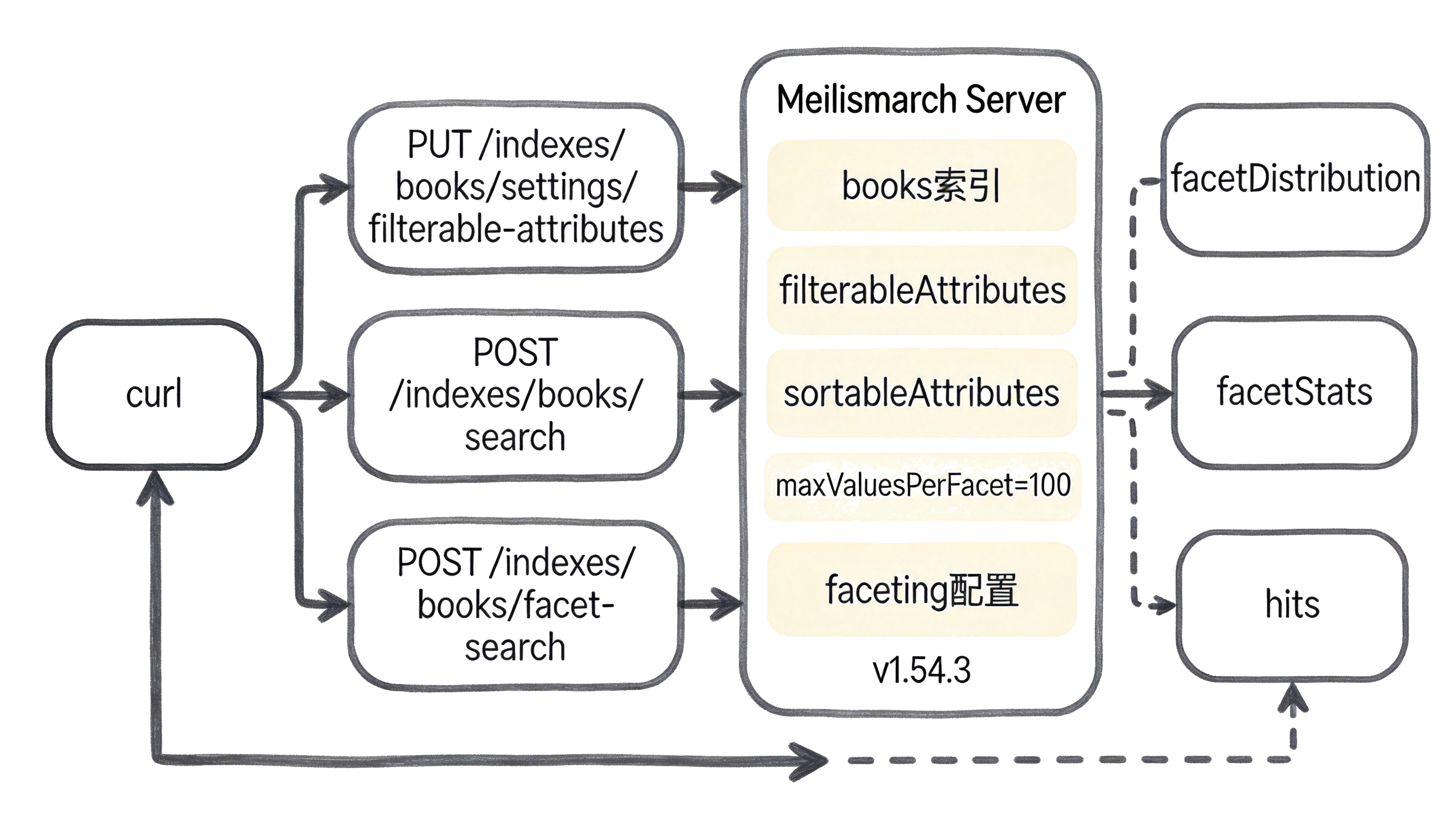
| 概念 | 是什麼 | 類比 |
|---|---|---|
| filterableAttributes | 聲明後可被 filter/facets 使用的屬性白名單,預設空陣列;更新會重索引全部文檔 | 像數據庫裡“可查詢字段”白名單,沒登記就查不了也分不了面 |
| filter 表達式 | 搜索的過濾條件,属性 操作符 值,操作符含 = != > < TO IN EXISTS,用 AND/OR/NOT + 括號組合;AND 優先級高於 OR |
像 SQL 的 WHERE 子句,屬性得先登記(filterableAttributes)才能用 |
| q 與 filter 的區別 | q 是在 searchableAttributes(預設所有字段)裡按詞做全文檢索,帶容錯和前綴匹配、按相關性排序(非子串匹配);filter 是對 filterableAttributes 做結構化篩選(命中/排除,不排序)。可疊加:filter 先縮小集合,q 再排序 |
像電商搜索:q 是搜索框裡輸的關鍵詞,模糊匹配按相關度排;filter 是左側篩選器,點分類/價格區間精確過濾 |
| facetDistribution | 分面分布統計:每個分面屬性 → 每個分面值 → 匹配文檔數,由 facets 參數觸發 |
像電商左側分類計數,每個分類下面掛著有多少件商品 |
| facetStats | 數值分面的 min/max 統計,只統計 JSON number 類型的字段 | 像價格滑桿的兩端刻度,前端拿它畫區間篩選器 |
| facet-search | POST /indexes/{uid}/facet-search,分面值的自動補全/下拉搜索,facetName 必須在 filterableAttributes |
像搜索框的聯想下拉,輸入 “fic” 出 “Fiction” 及計數 |
| sortableAttributes | 聲明後可被 sort 使用的屬性白名單,與 filterableAttributes 相互獨立;一個字段可同時進兩個列表 | 像 SQL 的 ORDER BY 字段白名單,filter 和 sort 各管各的授權 |
常見問題
facetDistribution 裡某個分面缺失/為空,且服務端沒有任何報錯
現象:搜索請求帶了 facets 參數,響應裡 facetDistribution 缺了某個屬性,或整個為空;Meilisearch 不報 4xx。
原因:facets 裡傳入的屬性沒有加入 filterableAttributes,Meilisearch 對分面屬性靜默忽略(與 filter 報 invalid_search_filter 截然不同),UI 上表現為分面欄消失或為空。
filter 組合結果不符預期,OR 把 AND 的約束“吞”掉了
現象:genres = Fantasy OR genres = Science Fiction AND language = English 返回的結果裡混入了 language 不是 English 的文檔。
原因:AND 優先級高於 OR,去掉括號的表達式被解析為 genres = Fantasy OR (genres = Science Fiction AND language = English);跨條件組合必須顯式加括號。
invalid_search_sort:filter 正常,一加 sort 就報錯
現象:filter 搜索返回正常,往 body 里加 "sort":["price:desc"] 後返回 400,錯誤碼 invalid_search_sort。
原因:sort 用到的屬性未在 sortableAttributes 裡聲明——filterable 與 sortable 是兩套獨立白名單,一個字段可同時出現在兩個列表(filterableAttributes 與 sortableAttributes 都含 price 才能做 filter+sort 組合)。
invalid_facet_search_facet_name
現象:POST /indexes/books/facet-search 返回 400,錯誤碼 invalid_facet_search_facet_name。
原因:facetName 不在該索引的 filterableAttributes 列表中(屬性名拼錯,或忘了聲明);facet-search 的前置條件是分面屬性必須可過濾。