
跟著這篇走完,你會在終端把 Meilisearch 的排序跑通:用 sort 參數給搜索結果按評分、價格、日期排序,再把“新品優先”這類規則寫進索引設置裡常駐生效。整個過程 7 步,每步都有一條命令能驗證自己做對了沒有。
動手前先交代下環境。localhost:7700 是 Meilisearch 的預設監聽地址,master key 固定用 aSampleMasterKey(與系列一致),索引(Meilisearch 的獨立文檔集合,相當於一張數據表)固定用 books_sort(本篇新建,不動前面的 books_zh),示例文檔是 6 條虛構書籍;你要是換了端口、master key 或索引名,把示例值替換掉就行。這篇預設你已經裝好並跑通了從零跑通 Meilisearch 本地搜索服務,還沒跑起來先回去把服務起了再回來,安裝、啟動、異步任務輪詢的套路全部複用第一篇。

前置條件
| 項 | 要求 | 說明 |
|---|---|---|
| Meilisearch | v1.54.3 或更高 | 與第一篇一致;本篇關鍵前提是版本 ≥ v1.36(預設規則拆成 attributeRank + wordPosition),太低照做會報錯 |
| 前置文章 | 已跑通 meilisearch-local-search |
複用其安裝/啟動/master key/異步任務輪詢套路;沒跑通先回去補 |
| master key | aSampleMasterKey |
與系列一致 |
| curl | 任意版本 | 全文用 curl 調 REST API |
先跑這條,確認第一篇的服務還活著。
curl http://localhost:7700/health{"status":"available"}返回 {"status":"available"} 就滿足條件。要是返回 curl: (7) Failed to connect to localhost port 7700,說明服務沒起——回第一篇第一步用 meilisearch --master-key="aSampleMasterKey" 重新啟動,再回來。
第一步:確認服務在跑、版本對不對
本篇大量依賴一個事實:v1.36 起 Meilisearch 把預設規則裡的 attribute 拆成了 attributeRank 和 wordPosition,預設排名規則(rankingRules,決定搜索結果先後順序的規則列表)從 6 條變成 7 條。後面寫排名規則時要按新名單來,所以第一步先把版本確認掉,省得照老教程做了一路、最後在設置接口上報錯。
curl http://localhost:7700/version -H "Authorization: Bearer aSampleMasterKey"{"commitSha":"7ebd97e38c36882b0c78d79e433b9115b4f003b3","commitDate":"2026-10-01T11:51:22.000000000+02:00","pkgVersion":"1.54.3"}版本號在 pkgVersion 字段裡。驗證標準就一條:版本 ≥ 1.36 就行。低於 1.36 的舊版預設規則不含 attributeRank/wordPosition,照本篇的命令做會踩到“找不到規則”之類的錯,先升級再回來。
第二步:建 books_sort 索引 + 寫 6 條書
排序要先有“可排序的字段”,而字段類型直接決定排對排錯。這一步把數據底座搭好:rating、price 用 JSON 數字,release_date 用 YYYY-MM-DD 格式的字符串——數字按數值比大小,日期按字符串詞典序比,這是後面所有步驟的前提。用獨立索引 books_sort,不動第一篇的 books_zh。
索引走顯式創建,直接指定主鍵字段為 id,避免自動推斷失敗:
curl -X POST http://localhost:7700/indexes \
  -H "Authorization: Bearer aSampleMasterKey" \
  -H "Content-Type: application/json" \
  -d '{"uid":"books_sort","primaryKey":"id"}'
{
"taskUid": 7,
"indexUid": "books_sort",
"status": "enqueued",
"type": "indexCreation"
}創建索引是異步任務(task,後臺執行的操作單元),返回體裡的 taskUid 就是任務編號。全新環境任務號從 0 開始;要是你的環境已經跑過其他任務,以實際返回的 taskUid 為準。
接著寫 6 條書:
curl -X POST http://localhost:7700/indexes/books_sort/documents \
  -H "Authorization: Bearer aSampleMasterKey" \
  -H "Content-Type: application/json" \
  --data-binary '[
    {"id": 1, "title": "三体", "author": "刘慈欣", "rating": 9.3, "price": 39.9, "release_date": "2008-01-01", "genres": ["科幻"]},
    {"id": 2, "title": "球状闪电", "author": "刘慈欣", "rating": 8.8, "price": 29.0, "release_date": "2004-06-01", "genres": ["科幻"]},
    {"id": 3, "title": "活着", "author": "余华", "rating": 9.1, "price": 35.0, "release_date": "1993-01-01", "genres": ["文学"]},
    {"id": 4, "title": "许三观卖血记", "author": "余华", "rating": 8.7, "price": 32.0, "release_date": "1995-03-01", "genres": ["文学"]},
    {"id": 5, "title": "明朝那些事儿", "author": "当年明月", "rating": 9.0, "price": 45.5, "release_date": "2006-09-01", "genres": ["历史"]},
    {"id": 6, "title": "万历十五年", "author": "黄仁宇", "rating": 8.9, "price": 28.0, "release_date": "1982-05-01", "genres": ["历史"]}
  ]'
{
"taskUid": 8,
"indexUid": "books_sort",
"status": "enqueued",
"type": "documentAdditionOrUpdate"
}文檔添加同樣是異步任務,POST 返回的 taskUid 只表示入隊,文檔還沒被索引。等對應任務 succeeded 再往下走。
確認數據到位:
curl http://localhost:7700/indexes/books_sort/stats \
  -H "Authorization: Bearer aSampleMasterKey"
{
"numberOfDocuments": 6,
"isIndexing": false,
"fieldDistribution": {
"author": 6, "genres": 6, "id": 6, "price": 6,
"rating": 6, "release_date": 6, "title": 6
}
}返回裡 numberOfDocuments 是 6、isIndexing 是 false,說明 6 條文檔全部索引完。要是數量是 0 或 isIndexing 還是 true,多半是任務沒等完就查,回第一篇把輪詢套路撿起來,見Meilisearch 添加文檔後立即搜索返回空結果。
第三步:先撞一次坑——不聲明就傳 sort
很多人以為排序屬性跟在文檔裡、直接傳 sort 就能排。這一步故意不聲明任何東西就傳 sort,讓報錯把“前置聲明”這個核心約束講明白:排序依賴為屬性預建的內部數據結構,必須在設置裡顯式聲明。
curl -X POST http://localhost:7700/indexes/books_sort/search \
  -H "Authorization: Bearer aSampleMasterKey" \
  -H "Content-Type: application/json" \
  -d '{"q":"","sort":["rating:desc"]}'
{
"message": "Index `books_sort`: Attribute `rating` is not sortable. This index does not have configured sortable attributes.",
"code": "invalid_search_sort",
"type": "invalid_request",
"link": "https://docs.meilisearch.com/errors#invalid_search_sort"
}rating 明明在文檔裡,為什麼不能排?因為 filter 有 filterableAttributes、sort 有 sortableAttributes,兩套列表相互獨立,預設都是空陣列。排序靠的是索引階段為屬性建好的列式結構,不能在搜索請求裡臨時為任意字段排序——把高成本操作前置到索引階段,是 filter/sort/facet 三者的統一設計。
順帶看一眼預設設置,把排名規則(rankingRules)的預設名單記下來,後面兩步要用:
curl http://localhost:7700/indexes/books_sort/settings \
  -H "Authorization: Bearer aSampleMasterKey"
{
"rankingRules": ["words", "typo", "proximity", "attributeRank", "sort", "wordPosition", "exactness"],
"sortableAttributes": [],
"filterableAttributes": []
}驗證就兩條:上面請求的返回碼是 invalid_search_sort(不是 200);settings 裡 sortableAttributes 是 []。要是你看到的是 Attribute "xx" is not filterable 那類報錯,說明把 sort 和 filter 的聲明搞混了,排查入口見Meilisearch sort 屬性未聲明報 invalid_search_sort。
第四步:聲明 sortableAttributes
第三步的報錯說明缺前置聲明,這一步補上。把三個要排的字段一次性放進 sortableAttributes(允許參與排序的屬性白名單):
curl -X PUT http://localhost:7700/indexes/books_sort/settings/sortable-attributes \
  -H "Authorization: Bearer aSampleMasterKey" \
  -H "Content-Type: application/json" \
  --data-binary '["rating","price","release_date"]'
{
"taskUid": 9,
"indexUid": "books_sort",
"status": "enqueued",
"type": "settingsUpdate"
}這一步有個容易忽略的點:設置更新也是異步任務(type 為 settingsUpdate),還會重索引該索引的全部數據。任務沒 succeeded 就髮帶 sort 的搜索,照樣報 not sortable——設定已經寫進去了,但舊索引還沒重建完。
驗證一下:
curl http://localhost:7700/indexes/books_sort/settings/sortable-attributes \
-H "Authorization: Bearer aSampleMasterKey"["price", "rating", "release_date"]返回三個屬性就成。注意返回順序是字母序(price/rating/release_date),跟你提交的順序無關,別拿這個當報錯。等不到 succeeded 就搜仍會報 not sortable,見Meilisearch 添加文檔後立即搜索返回空結果。
第五步:sort 參數排序
前置聲明到位,正式用 sort 參數。它寫在搜索請求 body 裡,格式是陣列,每項 属性:方向(asc 升序 / desc 降序),陣列順序即優先級。先跑單字段:空查詢(q 為空,官方叫 placeholder search——不搜關鍵詞、拿全量列表)加排序,就是“榜單/全量列表”場景:
curl -X POST http://localhost:7700/indexes/books_sort/search \
  -H "Authorization: Bearer aSampleMasterKey" \
  -H "Content-Type: application/json" \
  -d '{"q":"","sort":["rating:desc"]}'
hits 顺序(rating 降序):
三体 9.3 → 活着 9.1 → 明朝那些事儿 9.0 → 万历十五年 8.9 → 球状闪电 8.8 → 许三观卖血记 8.7再傳第二個字段做 tiebreaker(打平時用的決勝規則)。前面規則分出勝負就不再往後看,同 rating 的兩本才用 price:asc 決定先後:
curl -X POST http://localhost:7700/indexes/books_sort/search \
  -H "Authorization: Bearer aSampleMasterKey" \
  -H "Content-Type: application/json" \
  -d '{"q":"","sort":["rating:desc","price:asc"]}'
hits 顺序(rating 降序,同分按 price 升序):
三体 9.3/39.9 → 活着 9.1/35.0 → 明朝那些事儿 9.0/45.5 → 万历十五年 8.9/28.0 → 球状闪电 8.8/29.0 → 许三观卖血记 8.7/32.0這兩個數據集的 rating 沒有同分,看不出 tiebreaker 在動。再補一條查詢詞 + 排序組合的驗證,確認排序在文本查詢下也生效:
curl -X POST http://localhost:7700/indexes/books_sort/search \
  -H "Authorization: Bearer aSampleMasterKey" \
  -H "Content-Type: application/json" \
  -d '{"q":"刘慈欣","sort":["rating:desc"]}'
{
"hits": [
{"id": 1, "title": "三体", "author": "刘慈欣", "rating": 9.3},
{"id": 2, "title": "球状闪电", "author": "刘慈欣", "rating": 8.8}
],
"estimatedTotalHits": 2
}期望輸出:三組結果順序與上面一致——q=刘慈欣 命中兩本,三體 9.3 排在球狀閃電 8.8 前。要是帶了 sort 返回 400 invalid_search_sort,多半是第四步沒等完或屬性名拼錯,見Meilisearch sort 屬性未聲明報 invalid_search_sort。
第六步:自定義排名規則(release_date:desc)
sort 參數有個侷限:每次請求都得傳,只對本次生效。而“新品優先”“評分優先”這類是常駐業務規則——產品上希望不傳任何參數、每次搜索都按它排。這一步把規則寫進索引設置,用自定義排名規則(custom ranking rule)。
語法跟 sort 參數一樣是 属性:方向,放進排名規則鏈(rankingRules)末尾。注意這裡必須把預設 7 條全帶上:PUT /settings/ranking-rules 是全量覆蓋語義,只傳新規則會把 words/exactness 全沖掉,相關度排序直接失效。
curl -X PUT http://localhost:7700/indexes/books_sort/settings/ranking-rules \
  -H "Authorization: Bearer aSampleMasterKey" \
  -H "Content-Type: application/json" \
  --data-binary '["words","typo","proximity","attributeRank","sort","wordPosition","exactness","release_date:desc"]'
{
"taskUid": 10,
"indexUid": "books_sort",
"status": "enqueued",
"type": "settingsUpdate"
}設置更新同樣要等 succeeded,並觸發全量重建。
驗證常駐生效——不傳 sort 參數,直接搜:
curl -X POST http://localhost:7700/indexes/books_sort/search \
  -H "Authorization: Bearer aSampleMasterKey" \
  -H "Content-Type: application/json" \
  -d '{"q":"刘慈欣"}'
{
"hits": [
{"id": 1, "title": "三体", "author": "刘慈欣", "release_date": "2008-01-01"},
{"id": 2, "title": "球状闪电", "author": "刘慈欣", "release_date": "2004-06-01"}
],
"estimatedTotalHits": 2
}release_date:desc 是鏈尾規則,作為 tiebreaker 生效:文本相關度先裁決,打平時新書靠前。三體(2008)排到球狀閃電(2004)前。要是 PUT 返回 400,檢查語法——舊版函數式寫法 desc(release_date) 自 v0.22 起廢棄,見Meilisearch 自定義排名規則舊語法報 invalid_settings_ranking_rules。
第七步(進階):規則鏈位置的影響
自定義規則放鏈尾是“軟排序”,放鏈首就變成“硬排序”——排名規則從第一條開始裁決,越靠前權重越大。先跑一次基線,記住當前設定(release_date:desc 在鏈尾)下 q=三 的順序:
curl -X POST http://localhost:7700/indexes/books_sort/search \
  -H "Authorization: Bearer aSampleMasterKey" \
  -H "Content-Type: application/json" \
  -d '{"q":"三"}'
{
"hits": [
{"id": 1, "title": "三体", "rating": 9.3},
{"id": 4, "title": "许三观卖血记", "rating": 8.7}
],
"estimatedTotalHits": 2
}三體(9.3)在前、許三觀賣血記(8.7)在後。現在把 rating:asc 挪到鏈首,讓評分成為第一裁決規則:
curl -X PUT http://localhost:7700/indexes/books_sort/settings/ranking-rules \
  -H "Authorization: Bearer aSampleMasterKey" \
  -H "Content-Type: application/json" \
  --data-binary '["rating:asc","words","typo","proximity","attributeRank","sort","wordPosition","exactness"]'
{
"taskUid": 11,
"indexUid": "books_sort",
"status": "enqueued",
"type": "settingsUpdate"
}等任務 succeeded,再搜同一個 q=三:
curl -X POST http://localhost:7700/indexes/books_sort/search \
  -H "Authorization: Bearer aSampleMasterKey" \
  -H "Content-Type: application/json" \
  -d '{"q":"三"}'
{
"hits": [
{"id": 4, "title": "许三观卖血记", "rating": 8.7},
{"id": 1, "title": "三体", "rating": 9.3}
],
"estimatedTotalHits": 2
}順序整個翻轉:評分 8.7 的許三觀賣血記排到 9.3 的三體前。這就是位置即權重——規則越靠前越貼業務排序、越犧牲相關度。規則鏈從第一條開始裁決,rating:asc 放鏈首意味著先按評分升序硬排,words 那套相關度規則只在評分平局時才輪到。
驗證完收尾,把排名規則恢復預設,別汙染後面系列文章的實驗環境:
curl -X DELETE http://localhost:7700/indexes/books_sort/settings/ranking-rules \
  -H "Authorization: Bearer aSampleMasterKey"
{
"taskUid": 12,
"indexUid": "books_sort",
"status": "enqueued",
"type": "settingsUpdate"
}等 succeeded 後 GET /settings,rankingRules 應回到預設 7 條。到這裡排序與自定義排名就全跑通了。
核心概念
下面這張圖是整條調用鏈路的走向,從左到右就是一次請求的完整路徑。
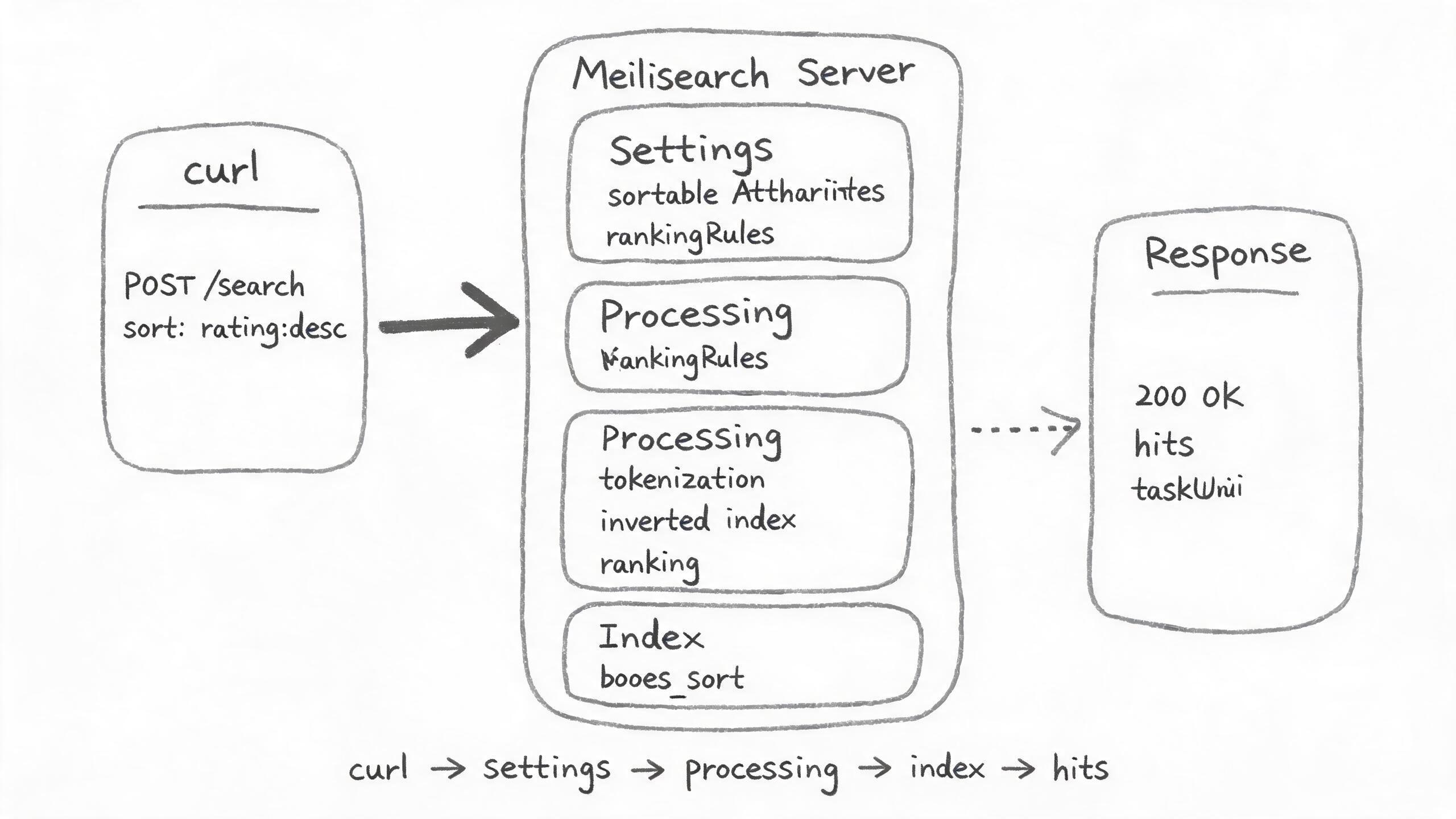
| 概念 | 是什麼 | 類比 |
|---|---|---|
| rankingRules(排名規則鏈) | 決定搜索結果先後順序的規則列表,從頭到尾一條條裁決,排前面的規則權重更大 | 像考試閱卷順序:先看總分定名次,同分再看單科 |
| sortableAttributes | 聲明“允許參與排序”的屬性列表,不聲明就無法用 sort | 像 SQL 裡 ORDER BY 的字段白名單 |
| sort 參數 | 搜索請求裡臨時傳的排序條件,如 ["rating:desc"],只對本次請求生效 |
像在結果頁臨時點一次“按價格排序” |
| 自定義排名規則 | 寫死在索引設置裡的常駐排序規則(release_date:desc),不傳 sort 也生效 |
像平臺預置的“新品優先”排序,用戶不用點 |
| tiebreaker | 前面規則打平時的“決勝規則”,多字段排序裡第二個字段就是 tiebreaker | 像比賽同分時看淨勝球 |
| 異步任務(task) | 設置/寫入類操作後臺執行,返回 taskUid,要輪詢到 succeeded 才生效 | 像後臺發貨:下單先返回訂單號,物流到了才算完 |
| 全量重建索引 | 設置變更後 Meilisearch 重算全部文檔的內部索引,耗時與數據量成正比 | 像給大表加索引要重掃一遍數據 |
| placeholder search | 空查詢(q 為空)的搜索,用來拿“全量列表 + 排序/分頁” | 像不搜關鍵詞直接翻商品總列表 |
常見問題
invalid_search_sort:屬性沒聲明就傳 sort
現象:搜索請求帶 "sort":["rating:desc"] 返回 400,錯誤碼 invalid_search_sort,rating 明明存在於文檔裡。
原因:排序屬性未在 sortableAttributes 裡聲明。filter 用 filterableAttributes、sort 用 sortableAttributes,兩套獨立白名單,預設都是空陣列。
invalid_settings_ranking_rules:設排名規則返回 400
現象:PUT /settings/ranking-rules 傳 ["words",...,"desc(release_date)"] 返回 400,錯誤碼 invalid_settings_ranking_rules。
原因:用了舊版函數式語法 asc()/desc(),自 v0.22 起廢棄。現行寫法是 属性:asc / 属性:desc,如 "release_date:desc"。
排序不生效:聲明瞭 sortableAttributes 結果還是舊順序
現象:PUT sortable-attributes 或 ranking-rules 後立即搜索,結果順序沒有任何變化,也不報錯。
原因:設置更新是異步任務(settingsUpdate)且觸發全量重建索引。任務還在 enqueued/processing 時搜索,用的仍是舊索引。輪詢 GET /tasks/{taskUid} 到 status: succeeded 再搜。